What Is a Noindex Tag?
A noindex tag is a rule, added to a page as a robots meta tag or an X-Robots-Tag HTTP response header, that tells search engines not to include that page in search results. Once Google crawls the page and sees the rule, it drops the page from results entirely, even if other sites link to it.
More About Noindex Tags
You can add the noindex meta tag to the <head> section of a page's HTML, or send the same rule in an X-Robots-Tag HTTP response header. Either way, a crawler has to reach the page to see the rule at all. If a robots.txt file blocks the page, the crawler never sees the noindex rule, and the page can still appear in search results, for example when other pages link to it. So check robots.txt before you rely on noindex, not after.
Noindex tags are for pages your site needs but that have no reason to appear in a search engine's index or on results pages. Thank-you pages, admin login pages, and author archives are classic examples. Your site may need them, but no one will ever search for them on Google.
How to add a noindex tag
The meta tag version is one line inside the page's <head>:
<meta name="robots" content="noindex">
That rule applies to search engine crawlers that support it, Google included. For non-HTML files such as PDFs, there's no <head> to hold a meta tag, so the server sends the same instruction as an HTTP response header instead: X-Robots-Tag: noindex.
In WordPress, you rarely write the tag by hand. SEO plugins offer a per-page setting that outputs it for you. Be careful with the sitewide version, though: the "Discourage search engines from indexing this site" checkbox under Settings → Reading adds a noindex,nofollow meta tag to every page of your site (WordPress 5.3 and later). It's useful while a site is under construction and a classic launch-day accident when it's left on. Uncheck it before you go live.
Noindex doesn't stop crawling
A noindex tag controls indexing, not crawling. In fact, it depends on crawling: a search engine has to visit the page and read the tag before it can act on the rule. Google's noindex documentation spells out what happens next: once Googlebot crawls the page and extracts the rule, the page is dropped from Google's results entirely, regardless of whether other sites link to it.
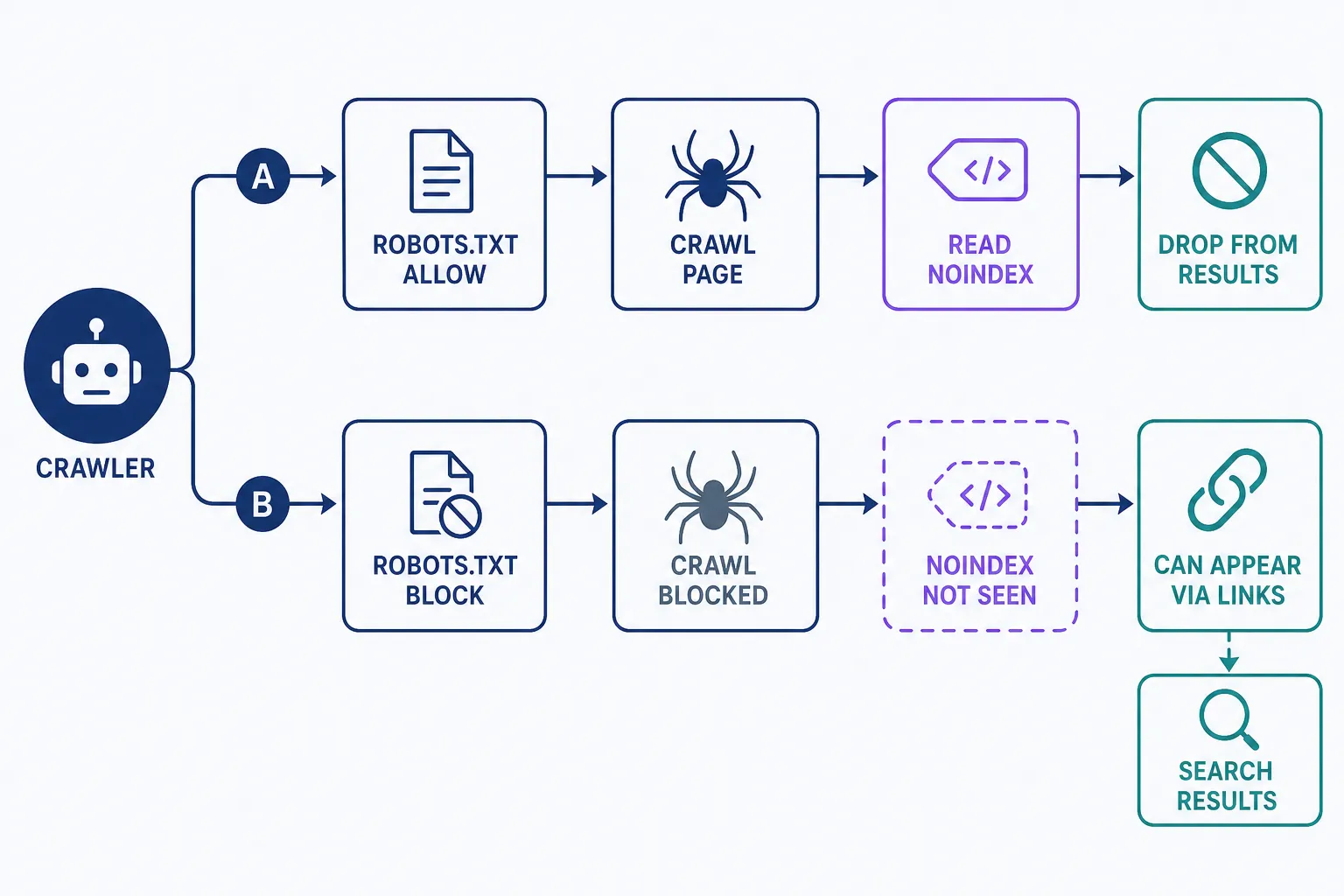
Noindex is not a privacy tool, either. The page stays live, so anyone with the URL can visit it, and so can bots that ignore the rule. Only password protection actually restricts access, which is why Google recommends it for content that must stay private.
Noindex vs. nofollow vs. robots.txt
Three controls get confused with each other, and they do different jobs:
- Noindex keeps a crawlable page out of search results. Visitors and crawlers can still reach the page.
- Robots.txt manages crawler traffic. Google's robots.txt documentation states it "is not a mechanism for keeping a web page out of Google," because a blocked page can still be indexed when other pages link to it.
- A nofollow attribute applies to a single link and tells search engines not to pass ranking credit through it. It removes nothing from the index.
The decision rule: use noindex for pages that should exist but shouldn't appear in search results. Use robots.txt to keep crawlers out of sections that would waste their time, never to hide a page. Use password protection for anything genuinely private. And if two pages are duplicates, don't noindex the copy; set a canonical URL so search engines know which version to show.
How to check that a noindex tag is working
Removal isn't instant. Google has to recrawl the page and see the tag first, and a recrawl can take anywhere from a few days to a few weeks. To confirm it worked, open the URL Inspection tool in Google Search Console: it shows whether the noindex rule was detected on the last crawl. From the same tool you can request a recrawl to move things along, though Google doesn't promise a schedule.
If the page is still showing up weeks later, the usual culprit is the one covered above: robots.txt is blocking the page, so Google never saw the tag. Fix the block, then request another crawl. New to Search Console? Our beginner's guide to Google Search Console covers the basics.
Frequently Asked Questions
- No. Google ended support for the unofficial noindex directive in robots.txt on September 1, 2019. Its documentation now says robots.txt is not a mechanism for keeping a page out of Google. Use a robots meta tag or an X-Robots-Tag header instead.
- Yes. A robots meta tag accepts multiple rules separated by commas. Setting content="noindex,nofollow" keeps the page out of search results and asks crawlers not to follow any of the links on it.
- Noindex is for pages visitors still need, like an order-confirmation page. If nobody needs the page anymore, delete it instead. A noindex tag keeps a live page out of search results; it isn't a substitute for removing content that shouldn't exist.
- A noindex rule is all or nothing for the page. For finer control, Google supports the data-nosnippet attribute on HTML elements, which keeps the marked text out of search snippets while the page itself stays indexed.
Professional SEO Services
Our Pro Services team will help you rank higher and get found online. Let us take the guesswork out of growing your website traffic with SEO.
SEO Services