What is a Robots.txt file?
A robots.txt file is a plain text file placed at a website’s root (example.com/robots.txt) that tells search engine crawlers which URLs they can and can’t access, following the Robots Exclusion Protocol. It controls crawling, not indexing: to keep a page out of Google, use a noindex directive or password protection instead.
More about robots.txt files
Robots.txt files are not strictly necessary. Without one, crawlers assume there are no crawl restrictions: Google treats a missing robots.txt file (a 404) as if the file didn't exist and may crawl everything it can reach. However, most sites can benefit from the inclusion of a robots.txt file in order to help guide crawlers.
A robots.txt file can allow or disallow the crawling of certain pages, allow specific pages that a broader rule would block, and point crawlers to your sitemap. It can't force a page to be crawled, though, and it isn't a reliable way to keep a page out of search results; use a noindex tag for that.
How a robots.txt file works
Before crawling a site, a search engine spider requests the file from the site's root: example.com/robots.txt. The file is plain text, organized into groups. Each group starts with a User-agent line naming the bot it applies to (Googlebot, Bingbot, or * for everyone), followed by Disallow and Allow lines listing the paths that bot may or may not request. A bot looks for a group with its own name first and follows the * group if it doesn't find one.
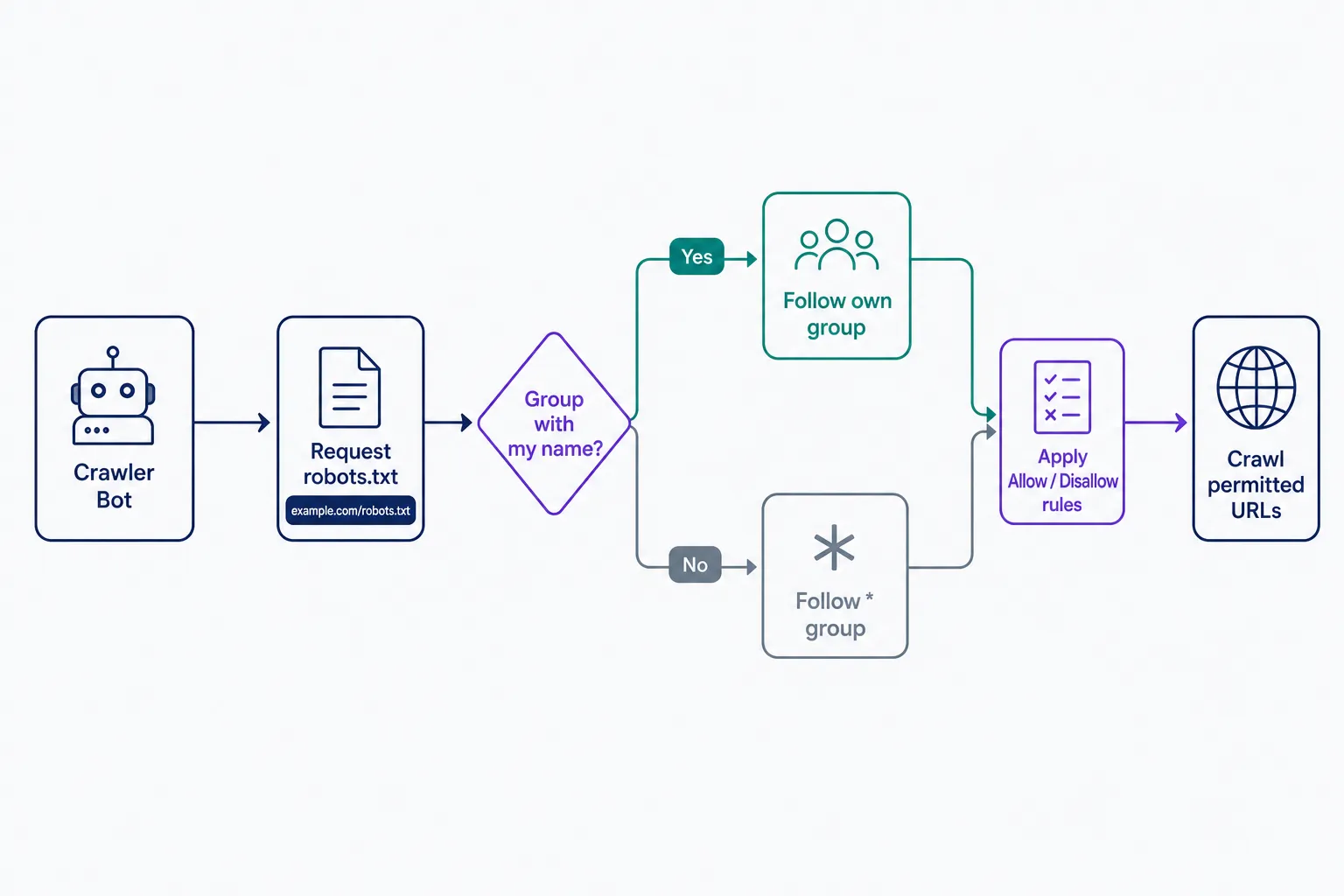
Scope is narrow by design. The rules only cover the exact host the file sits on, so blog.example.com needs its own robots.txt file. The one at example.com doesn't apply to it.
What a robots.txt file looks like
Here's a typical WordPress site's robots.txt file, 4 lines long:
User-agent: *applies the rules that follow to every bot without a group of its own.Disallow: /wp-admin/tells crawlers not to request anything in the WordPress admin area.Allow: /wp-admin/admin-ajax.phpcarves out one exception, a file that themes and plugins use on public pages.Sitemap: https://example.com/sitemap.xmlpoints crawlers at your XML sitemap, the list of URLs you do want crawled. If your file doesn't have a Sitemap line, add one with your sitemap's full URL.
Two mistakes cause most robots.txt damage. The first is Disallow: /: the lone slash matches every URL, so it blocks the entire site from crawling, and it's usually a leftover from staging that went live with the site. The second is blocking CSS or JavaScript directories. Google needs those files to render your pages, so blocking them can hurt how your pages are evaluated. If search traffic drops right after a launch, check this file first.
Robots.txt vs. noindex
The most common robots.txt mistake is treating it as a removal tool. Google's documentation is direct: robots.txt “is not a mechanism for keeping a web page out of Google.” The two controls split the work like this:
- Robots.txt controls crawling. It decides which URLs a bot may request, nothing more.
- A blocked page can still be indexed. If other pages link to a URL that robots.txt blocks, Google can index it without ever visiting; Search Console labels these URLs “Indexed, though blocked by robots.txt.”
- A noindex tag removes a page from results, but the crawler has to see it. A page blocked in robots.txt never gets its noindex tag read, so don't combine the two.
The decision rule: use robots.txt to manage crawler traffic and protect your crawl budget, a noindex tag to keep pages out of search results, and a password for anything genuinely private. A staging site is the classic example. Robots.txt is the wrong tool there twice over: a blocked page can still be indexed, and the file itself is public, so a Disallow line naming a private path advertises exactly where it is. Password-protect staging sites instead.
Voluntary rules, not access control
Robots.txt is a request, not a lock. The Robots Exclusion Protocol started as an informal convention in 1994 and only became a formal internet standard in September 2022, as RFC 9309. The RFC says plainly that the rules “are not a form of access authorization.” Reputable crawlers follow them; scrapers and malicious bots ignore them. And since anyone can open your robots.txt file in a browser, never list paths you want kept secret. Use real authentication for anything private, and treat robots.txt purely as traffic direction.
Blocking AI crawlers
Robots.txt is also where you set rules for AI bots. OpenAI documents two main crawlers, and both follow robots.txt rules: GPTBot collects content for training its models, while OAI-SearchBot surfaces sites in ChatGPT search. Each is controlled separately. To opt out of AI training, add a group with User-agent: GPTBot and Disallow: /. OpenAI notes ChatGPT search can take about 24 hours to pick up a robots.txt change.
Weigh the trade-off before you block. Sites that disallow OAI-SearchBot won't be shown in ChatGPT search answers, so blocking AI crawlers can cost you the visibility and referral traffic those answers bring. Whatever you decide, start by opening yourdomain.com/robots.txt in a browser and reading what's already there; it's the fastest robots.txt audit you can run.
Frequently Asked Questions
- Use the robots.txt report in Google Search Console. It shows which robots.txt files Google found for your site's top 20 hosts, when each was last crawled, and any parsing errors or warnings, and it lets you request a recrawl after you fix something.
- Google found links to the page elsewhere and indexed the URL without crawling it. To fix it, unblock the path in robots.txt, add a noindex tag to the page, then request a recrawl in Search Console. A blocked page can't show Google its noindex tag.
- Yes. If no physical robots.txt file exists, WordPress answers requests for /robots.txt with a default that disallows /wp-admin/ and allows admin-ajax.php. To customize it, upload your own file to the site root or edit the virtual file with an SEO plugin.
- Yes. The file must be named robots.txt, all lowercase, and live at the site root; the URL is case-sensitive like any other URL. Crawlers don't look for the file in subdirectories, so a file at example.com/folder/robots.txt is ignored.
Professional SEO Services
Our Pro Services team will help you rank higher and get found online. Let us take the guesswork out of growing your website traffic with SEO.
SEO Services