What Is Crawling in SEO?
In SEO, crawling is the process search engine bots use to discover and read web pages so those pages can later be indexed and ranked. The bots, often called crawlers or spiders, review everything they can find on a page and follow its links to reach more pages.
More About Crawling
When a search engine bot crawls a web page, it reviews all the content and code it can find: plain text, images and alt text, links, and the underlying markup.
Crawlers note the links they find and add those pages to their crawl list, which makes internal links the paths bots follow through your site. Search engines also cap how many pages they'll crawl on a site in a given timeframe, a limit known as your crawl budget.
How crawling works
Google's crawler is called Googlebot. It starts from a list of URLs it already knows about, fetches those pages, and follows the links it finds to discover new ones. According to Google's How Google Search works documentation, the vast majority of pages in its results were never manually submitted: crawlers found them automatically by following links. Google's automated systems decide how often each site gets crawled, and Google doesn't accept payment to crawl a site more frequently.
Crawling vs. indexing
Crawling and indexing are separate steps, and the difference matters when a page won't show up in search results:
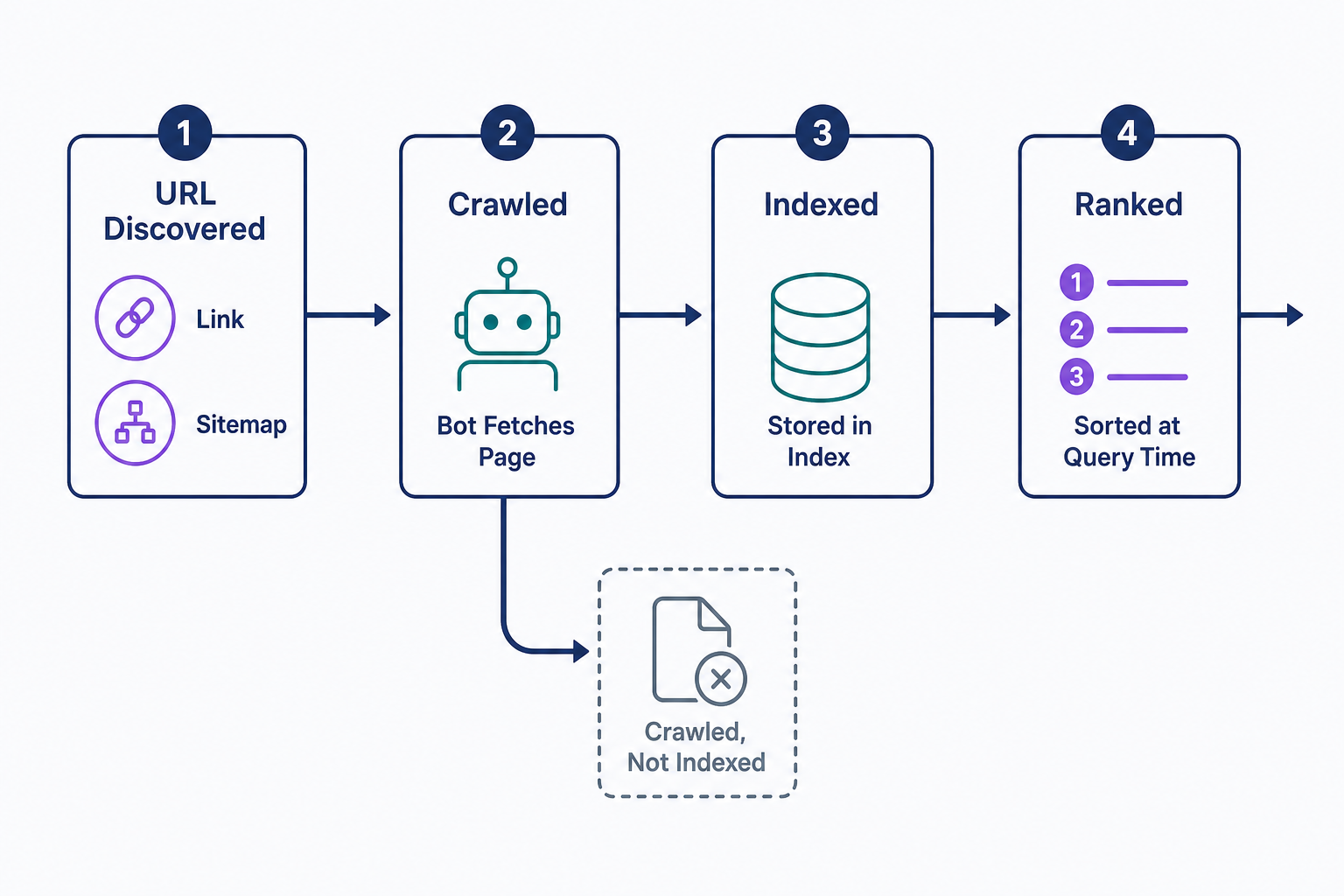
- Crawling is discovery: a bot finds a URL and fetches its content.
- Indexing is storage: the search engine processes what the crawl found and may add the page to its index, the database that search results are pulled from.
- Ranking happens later, at search time: ranking systems sort indexed pages by relevance to each specific query.
Crawling doesn't guarantee indexing. Google's technical requirements for Search say it plainly: even a page that meets every requirement may never be indexed. Search Console has a status for exactly this, "Crawled - currently not indexed," so a page can sit in the crawl records and still be missing from results. Crawling and indexing make a page eligible to rank; they don't assign it a fixed position.
Getting your pages crawled
Most pages are discovered without any help, but three actions speed things up:
- Submit an XML sitemap. It hands crawlers a complete list of the URLs you want crawled instead of leaving discovery to links alone.
- Request a recrawl. In Google Search Console, paste the page's URL into the URL Inspection tool and select Request indexing.
- Link to every page from somewhere. Google finds a URL only through a link from a known page or a sitemap entry, so a page nothing links to may never be found.
If you haven't set up Search Console yet, our beginner's guide to Google Search Console walks through it step by step.
Controlling what gets crawled
Not every page deserves a crawler's attention, and two tools control it. They do different jobs:
- A robots.txt file tells crawlers which URLs they may not fetch. Google describes it as a tool for managing crawler traffic, not for hiding pages: a blocked URL can still be indexed if other pages link to it.
- A noindex tag keeps a page out of search results, but the page must stay crawlable. If robots.txt blocks it, the crawler never sees the noindex rule.
The rule of thumb: use robots.txt to keep bots out of sections that waste their time, and use a noindex tag when you want a page crawled but never shown in results.
Why Google isn't crawling your pages
When a page goes uncrawled, the cause is usually one of these four:
- Robots.txt blocks it. Run the URL through Search Console's URL Inspection tool to see whether a rule is shutting the crawler out.
- Nothing links to it. Google discovers URLs through links from known pages or a sitemap entry, so orphan pages go unfound. Add internal links, or list the page in your sitemap.
- The server keeps erroring. A page must return an HTTP 200 (success) status code to be eligible for indexing, so fix errors and slow responses first.
- The site is new. Google says it can take a week or so to start crawling a brand-new page or site. Submit a sitemap and request indexing of your homepage instead of waiting.
Checking crawl activity
To check a single page, paste its URL into the URL Inspection tool in Google Search Console. The result shows when Googlebot last crawled the page and what happened next. For a site-wide view, the Page indexing report counts which URLs have been crawled and indexed (and which were left out), and the Crawl Stats report shows Google's crawling history on your site, including how many requests it made and when. Outside Google's tools, your server's log files record every crawler visit directly.
Frequently Asked Questions
- There's no fixed schedule. Google's automated systems decide how often each site and page gets crawled, and you can't pay for more frequent crawling. After you request a recrawl, Google says the crawl can take anywhere from a few days to a few weeks.
- Crawl budget is the number of pages a search engine will crawl on your site in a given timeframe. It mainly matters for very large or rapidly changing sites; small sites rarely bump into the limit. Our crawl budget entry explains how to manage it.
- Yes. AI companies run their own crawlers to gather web content, separate from search engine bots, and robots.txt rules control the well-behaved ones. Our guide to stopping web crawlers and bots explains how to identify them and block the ones you don't want.
Professional SEO Services
Our Pro Services team will help you rank higher and get found online. Let us take the guesswork out of growing your website traffic with SEO.
SEO Services