What is Analytics?
Analytics is the practice of collecting, analyzing, and interpreting data to guide decisions. In SEO, that data includes keyword performance, website traffic, and competitor benchmarks. SEO analytics helps you diagnose how your site performs in search and choose actions that support your goals, such as qualified traffic, leads, and conversions.
More About Analytics
Analytics turns raw data into decisions: you collect it, analyze it, and act on what it shows. In SEO analytics, that data can come from several sources, including Google Analytics, Google Search Console, a website’s server logs, and third-party SEO suites like Ahrefs and Moz. The Google tools are free; Ahrefs and Moz are paid subscriptions.
The point isn’t collecting numbers. It’s answering questions: how is your site performing in search engines, why did traffic rise or fall, and what should you change next?
How website analytics works
Most tools collect data in one of two ways. Tag-based tools like Google Analytics run a small JavaScript snippet on every page of your site and record each visit as it happens. Log-based tools read your web server’s access logs, which already record every request the server handles.
The difference has one practical consequence: a tracking tag only records visits from the moment you install it. There’s no retroactive history, so set up analytics before you need the data, not after.
The metrics analytics tracks
Six metrics cover most day-to-day questions. Tools calculate them differently, so the specific rules below come from Google Analytics 4 (GA4), the current version:
- Sessions: one visitor’s interactions grouped into a single stretch of activity. GA4 starts a session when someone opens a page with no session already active, and ends it after 30 minutes of inactivity by default. In plain terms, a session is roughly one visit.
- Pageviews: how many times a page is loaded. A single session can include many pageviews.
- Traffic source or channel: where visitors came from, such as organic search, social media, email, or typing your address directly.
- Bounce rate: the share of visits that end without meaningful interaction. GA4 counts a session as a bounce when it lasts under 10 seconds, triggers no key event (an action you’ve marked as important, like a purchase), and records only one pageview. It’s one of several engagement metrics.
- Click-through rate (CTR): the share of people who click your search listing after seeing it.
- Conversions: the actions that pay the bills, like purchases, sign-ups, or contact-form submissions; GA4 tracks these as key events. Raising the share of visitors who convert is conversion rate optimization.
Google Analytics vs. Google Search Console
Use both. They’re free, and they answer different questions:
- Search Console reports how your site performs in Google Search results: which queries showed your pages, and how many impressions and clicks each one earned. It credits everything to a page’s canonical URL, and it only covers Google.
- Google Analytics reports what visitors do after they arrive, from any source (search, social, email, ads), on any page carrying its tracking tag.
In short: Search Console tells you how people found you on Google, and Analytics tells you what they did next.
Diagnosing a traffic drop
Say traffic fell last month. Check your measurement before your SEO: confirm the tracking tag still loads on every page, because a redesign, a plugin update, or a new cookie-consent banner can cut off data collection. Then check the calendar. Compare against the same period last year rather than just the previous month, and note whether an outage, a migration, or a site release lines up with the start of the drop. A log of site changes, or annotations in your analytics tool, makes this step fast.
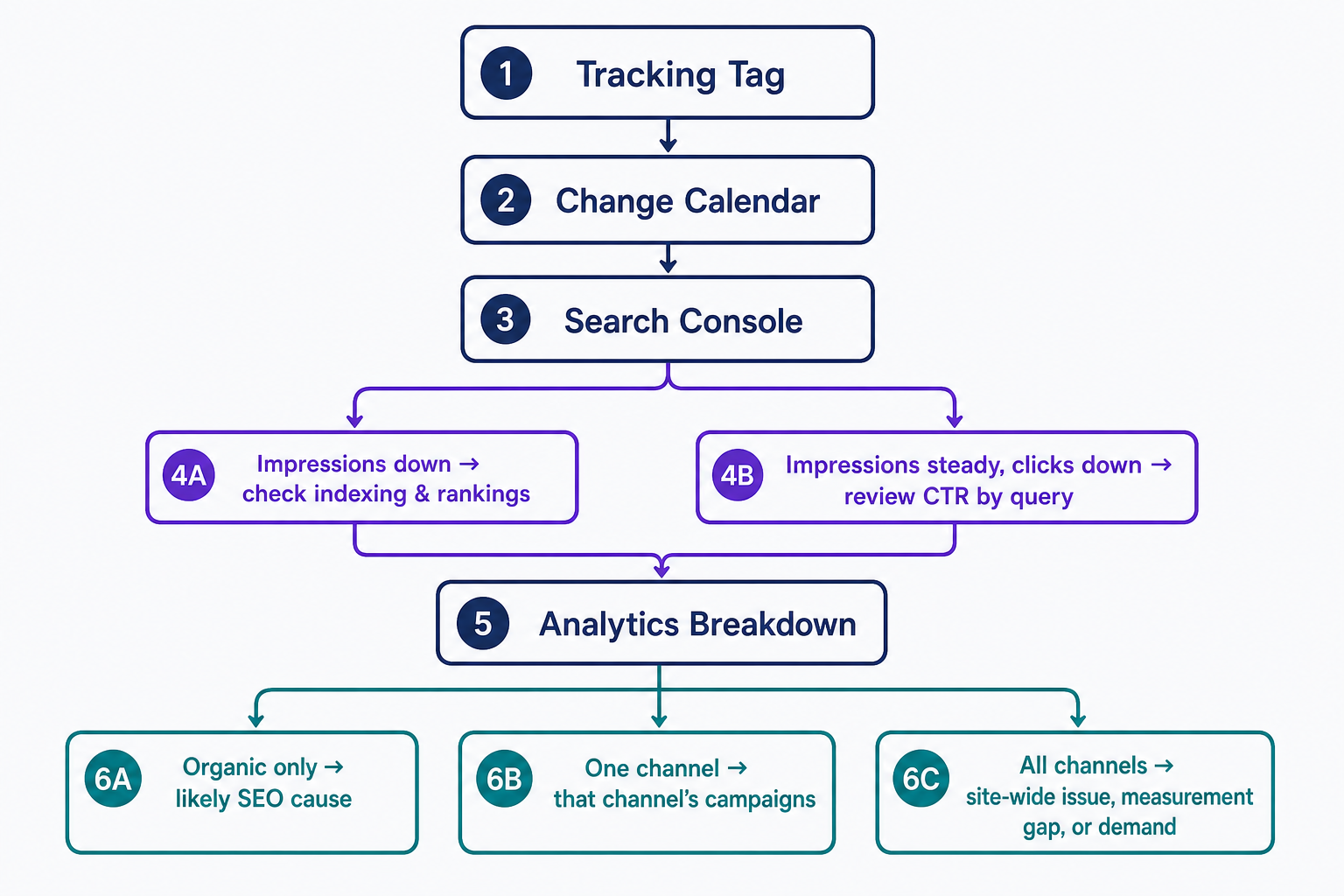
If measurement and timing check out, open Search Console’s Performance report and compare clicks and impressions for the last 28 days against the previous period. Falling impressions mean Google showed your pages less often, so investigate indexing and rankings, starting with the Pages report. Steady impressions with falling clicks mean your listings won fewer clicks, so review CTR query by query. Then break the drop down by page and channel in Google Analytics. A drop confined to organic search makes an SEO cause more likely; a drop in one paid or email channel usually starts with that channel’s campaigns; a drop across every channel points to a site-wide issue, a measurement gap, or simply lower demand. Each pattern is a lead to investigate, not a verdict.
Why your analytics numbers don’t match
Google Analytics and Search Console never agree exactly, and that’s normal. Search Console credits activity to a page’s canonical URL, while Analytics credits whatever URL carried the tag, so the same visit can land under two different pages. Google’s documentation walks through these discrepancies in detail.
Tag-based tools also undercount. Ad blockers stop the tracking script from loading, and visitors who decline a cookie-consent banner are never recorded, so your real audience is larger than the report says. And one month of data is rarely enough to separate a trend from noise. Treat analytics as directional, and act on sustained movement rather than single-day dips.
Setting up analytics on your site
Create a free Google Analytics property, add its tracking tag to your site, and verify ownership in Search Console. On WordPress, Google’s free Site Kit plugin connects your site to both services (plus other Google tools) from your dashboard; Google Tag Manager is another way to add the tag. Our guides to Google Site Kit and Google Search Console walk through setup step by step.
Frequently Asked Questions
- Google Analytics and Google Search Console are free. Third-party suites like Ahrefs and Moz are paid subscriptions built around keyword, backlink, and competitor research. The free Google tools only report on your own site, so add a paid suite when you need competitor data.
- Glance at traffic and top pages weekly, and review a full month against the prior period monthly. Also check after any major site change: a redesign, a migration, or a big content push. Checking daily just invites overreacting to normal fluctuation.
- Google Analytics 4 (GA4) is the current version of Google Analytics. Universal Analytics, its predecessor, stopped processing new data in July 2023 (standard properties) and shut down completely in July 2024, so make sure any guide or metric definition you follow is written for GA4.
Professional SEO Services
Our Pro Services team will help you rank higher and get found online. Let us take the guesswork out of growing your website traffic with SEO.
SEO Services