What is a Featured Image?
A featured image, also called a post thumbnail, is the image assigned to a WordPress post, page, or custom post type to represent it. Your theme decides where it appears on the site, in the blog feed or above the content, for example. Social networks use it as the link preview only when your site’s social metadata selects it.
More About Featured Images
WordPress lets you set a featured image on posts, pages, and custom post types, as long as your theme supports the feature. Where the image appears on your site is up to the theme: most themes show it in the blog feed, and many also display it at the top of the post itself.
A featured image does 3 jobs. It gives readers scanning your blog feed a preview that earns the click, and a consistent set turns your blog index into a branded grid. It can also become the preview image when the post is shared, but only if your site's social metadata (the Open Graph tags an SEO plugin like Yoast SEO adds) points to it. Set one on every post.
Setting a featured image in the editor
In the Block Editor, the option lives in the settings sidebar:
- Open the post and select the Post tab in the right-hand sidebar.
- Click Featured image, then Set featured image.
- Upload an image or pick one from your media library, then confirm.
The Classic Editor offers the same option in a Featured Image box on the edit screen. If you don't see the box, turn it on under Screen Options.
Choosing a size
Start with your theme's documentation for on-site display: the theme controls the dimensions, cropping, and placement of every featured image it shows, so the right size depends on the theme you run.
Social link previews are a separate decision. Our featured image size guide (updated July 7, 2026) recommends 1200 × 628 pixels there, the size Jetpack's image-size guide also lands on as the most social-compatible option. Two caveats: an image only becomes the preview when your social metadata selects it, and platforms may still crop it to their own ratios.
WordPress also generates smaller copies of every upload: a cropped 150 × 150 px thumbnail, plus medium and large versions capped at 300 and 1024 pixels by default. See thumbnail sizes for how those copies work.
Featured image vs. cover image
The two look alike on a published page but do different jobs:
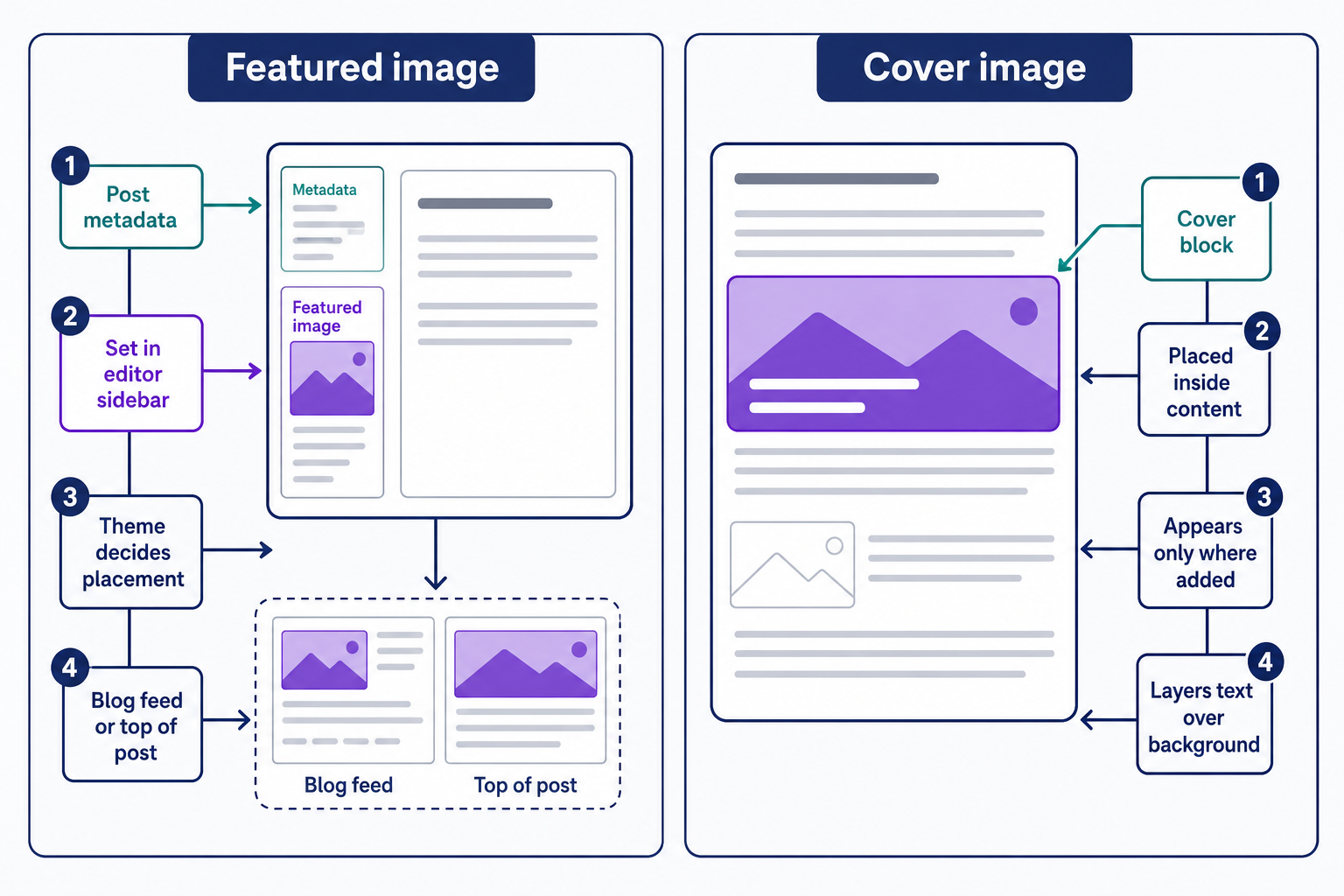
- A featured image is post metadata. You set it in the editor sidebar, and your theme decides where it shows, in the blog feed or at the top of the post, for example.
- A cover image is a Cover block placed inside your content. It layers text over a background image or video, and it appears only where you add it.
Use the featured image to represent the post wherever it's listed, and a Cover block for banners and headers inside the content. They can work together, too: the Cover block has a Use featured image option that pulls the featured image in as its background.
When a featured image doesn't show
Three causes cover most cases:
- No image is set. Open the post and check the Featured image panel first.
- The theme doesn't display featured images in that location, or the option is switched off in the theme's settings.
- A classic theme never declared featured-image support with add_theme_support( 'post-thumbnails' ), so the panel doesn't appear in the editor at all.
Placement is entirely the theme's decision, so the same post can show its image under one theme and hide it under another. Confirm the image is set, then check your theme's settings; if the panel itself is missing, the fix belongs in the theme, not the post.
Frequently Asked Questions
- Only when your site's Open Graph metadata selects it. Yoast SEO, for example, uses a post's featured image as the og:image whenever no dedicated social image is set. Facebook, LinkedIn, Pinterest, and WhatsApp all read that Open Graph data to build their link previews.
- Usually caching: Facebook stores the preview it scraped earlier, so a changed image doesn't appear right away. Paste the URL into Meta's Sharing Debugger and scrape again to refresh it. If the fresh scrape still shows the wrong image, your Open Graph tags point to a different one.
- You can set a featured image on any page, but many themes only display them on posts. Set one when your theme uses it, as a page header for example. For share previews on pages, Yoast SEO's featured-image fallback applies to posts only, so set a social image manually.
- Yes. WordPress's documentation also calls featured images post thumbnails, and theme functions like the_post_thumbnail() use that name. It's not the Thumbnail image size, though: that's the cropped 150 × 150 px copy WordPress automatically creates from every upload.
Powerful WordPress Hosting
Reliable, lightning-fast hosting solutions specifically optimized for WordPress. Find the perfect plan for you by clicking below.
WordPress Hosting Plans