What Is Duplicate Content?
Duplicate content is the same or very similar content that appears at more than one URL, either within one website or across different websites. It can be an entire page or repeated page elements, such as footers. Most duplicate content is accidental, caused by URL variations rather than deception.
More About Duplicate Content
Duplicate content can be an exact copy or a near copy, and search engines count it by the URL. Here's the classic example: a homepage that loads at http://example.com, https://example.com, https://www.example.com/, and https://www.example.com/?ref=nav is a single page with 4 addresses. Google can crawl each of those URLs separately, as its canonicalization documentation explains.
When a crawler like Googlebot finds the same content at several addresses, Google picks one URL as the canonical version and shows only that one in search results. If you don't signal which version you prefer, with a redirect or a rel="canonical" tag, Google may choose a URL you didn't want to rank, or it may not consolidate every ranking signal onto the version it does choose.
Does Google penalize duplicate content?
No. Accidental duplicate content won't get your site penalized. Google's John Mueller confirmed in a January 2021 Search Central office-hours session that duplicate content isn't a negative ranking factor, and that includes blocks repeated across every page of a site, such as footers. Google's spam policies only cover duplication that deceives users or manipulates search results, such as content scraped from other sites.
The real costs of duplicate content are subtler. Google shows a single version of duplicated pages, and it may not pick the one you wanted. Links that point at the other versions may not all count toward the URL that does rank, so the signals behind your search engine rankings can end up incomplete. On large or frequently changing sites, crawlers can also spend crawl budget on duplicate URLs, which leaves less attention for the pages that matter. For a small site, canonical selection is the bigger concern.
Common causes of duplicate content
Most duplicate content comes from a short list of technical causes:
- HTTP and HTTPS versions of the same site
- www and non-www versions of the same pages
- URL parameters added by sorting, filtering, or tracking links
- Region and device variants, such as a separate mobile version or near-identical pages for different countries
- Printer-friendly copies of pages
- A staging or demo site accidentally left open to crawlers
- Republished (syndicated) copies of your content on other domains
Finding duplicate content on your site
Three checks catch most duplication:
- Open the Page indexing report in Google Search Console. Duplicate URLs appear among the reasons pages aren't indexed, under the statuses "Duplicate without user-selected canonical" and "Duplicate, Google chose different canonical than user," which means Google overruled the canonical you declared. To see which canonical Google picked for one specific page, use the URL Inspection tool.
- Search Google for an exact sentence from one of your pages, in quotes, combined with the site: operator. Treat this as a rough discovery check: several matching URLs mean Google has found similar pages, not that it will rank the wrong one. Confirm what Google actually chose in Search Console.
- Crawl your site with a tool that compares content, status codes, and canonical tags to flag exact and near duplicates, such as Screaming Frog, and run a plagiarism checker to catch copies of your content on other domains.
Fixing duplicate content
Match the fix to the situation:
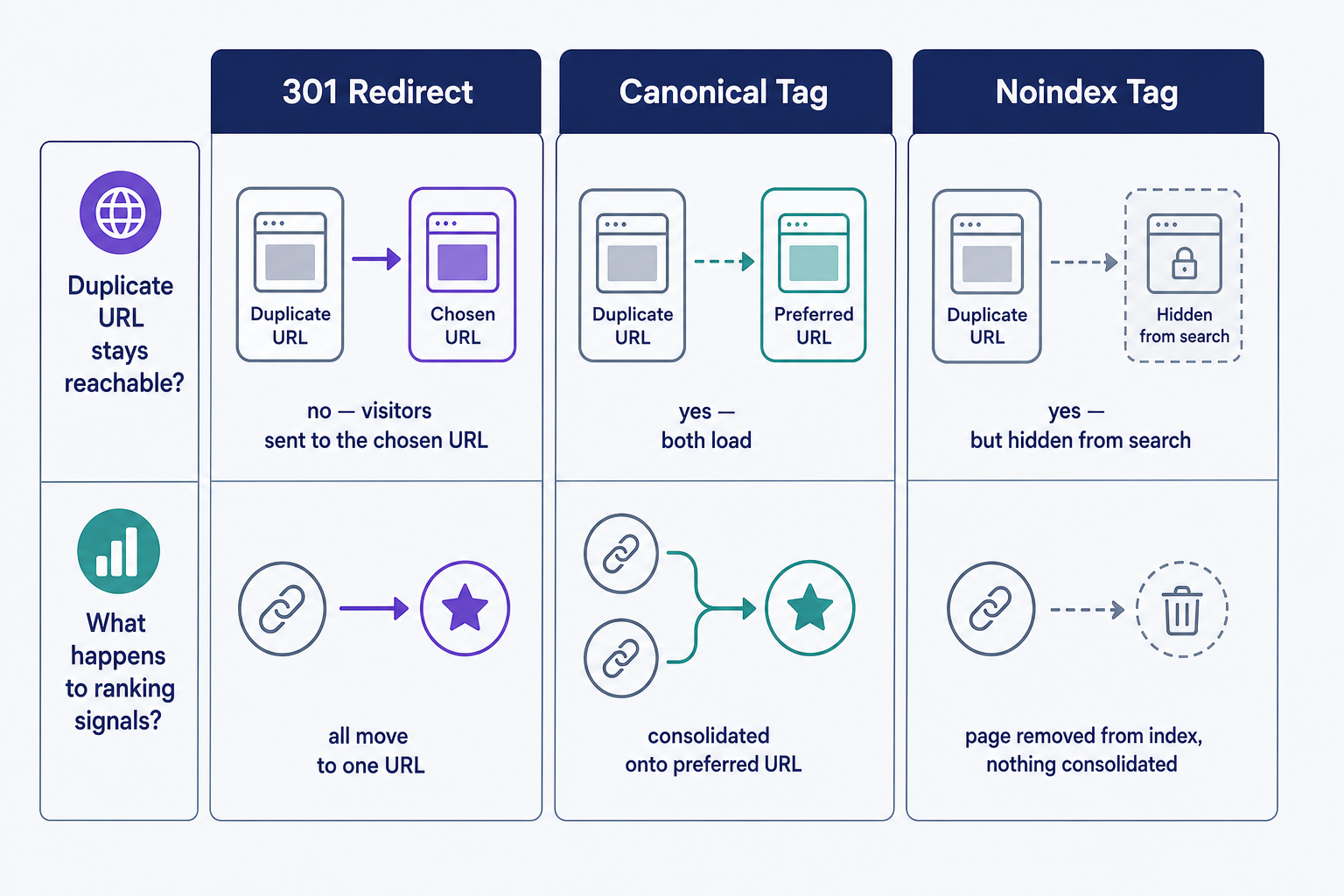
- 301 redirect: use one when the duplicate URL shouldn't exist at all, such as the HTTP version of an HTTPS site. Redirects sit at the top of Google's canonicalization signal hierarchy.
- Canonical tag: use rel="canonical" when both URLs need to stay accessible but only one should rank, such as filtered or sorted category pages.
- Noindex tag: use one to keep a duplicate out of Google's index entirely. It removes the page from search rather than consolidating signals, so reserve it for pages that should never rank.
- Consistent URL naming: pick one protocol, one hostname, and one format for every address, use that version in all internal links, and keep tracking URL parameters out of them.
- Careful syndication: when another site republishes your content, make a link back to your original part of the deal.
- Less boilerplate: repeated footers and sidebars won't hurt your rankings, but pages that are mostly shared template text give Google little unique content to work with.
When more than one fix would work, prefer the redirect. It's the strongest signal Google accepts, and it resolves the duplication for your visitors as well as for search engines.
Frequently Asked Questions
- There's no fixed percentage threshold. Some duplication is normal on every site: navigation, boilerplate, and quoted passages. Google only treats duplication as spam when it's deceptive, like scraped copies published at scale. Worry about whole pages or large blocks repeating across URLs, not repeated design elements.
- Google may identify the original on its own, so check first whether the copy actually outranks you. Act when it does, confuses your readers, or infringes content you own: ask the site to remove the copy, then file a copyright (DMCA) removal request through Google's reporting tool.
- Yes. Republishing an article on another domain creates cross-site duplication. Google no longer recommends a cross-domain canonical tag for syndication because the copies often differ. Instead, ask republishers to link back to your original and to block their copy from indexing with a noindex tag.
Professional SEO Services
Our Pro Services team will help you rank higher and get found online. Let us take the guesswork out of growing your website traffic with SEO.
SEO Services