What Is a Website Hack?
A website hack is unauthorized access to a website, its server, or its admin accounts. Attackers break in through stolen or brute-forced passwords, phishing, malware, or unpatched software vulnerabilities, then use the access to steal data, inject spam, or host malicious files. Ethical hacking is different: security testers break in with the owner’s permission.
More About Hacks
Hacking a website means gaining unauthorized access to it, whether by stealing credentials, exploiting software vulnerabilities, or installing malware. Not all hacking is malicious: ethical hackers run the same attacks with the owner's permission to find and fix flaws before criminals do. (The word originally described clever, harmless programming; the break-in sense took over in popular use later.)
Attackers use a compromised site to send spam, host malicious files, redirect visitors to scam pages, or steal customer data, at which point the hack has caused a data breach. For you as the owner, the damage compounds. Google Safe Browsing flags hacked sites with a browser warning like “The site ahead contains harmful programs,” which turns visitors away before your page even loads. Injected spam pages can drag down your search rankings, and a host can suspend an infected account. Our guide to fixing the Google malware warning covers the cleanup and review process.
How websites get hacked
Most break-ins come through a few predictable routes:
- Stolen or weak passwords, including brute-force attacks that cycle through password guesses until one works.
- Unpatched vulnerabilities in plugins, themes, or the CMS itself.
- Phishing and social engineering that trick you, or anyone with admin access, into handing over credentials.
- Insecure configurations, such as loose file permissions or an unprotected wp-config.php file. WordPress's hardening guide covers how to lock down both.
Hack vs. DDoS attack vs. malware
These three get mixed up because they often show up together, but they name different things:
- A hack gains unauthorized access to a site, server, or account.
- A DDoS attack floods a site with traffic to knock it offline. It disrupts; it doesn't break in.
- Malware is malicious software an attacker often installs after breaking in. It's the payload, not the break-in.
Signs your website has been hacked
A hacked site usually announces itself in one of a few ways:
- Visitors get redirected to sites you've never heard of.
- Admin users you didn't create appear in your dashboard.
- Spam pages or foreign-language keywords show up in your search results.
- Browsers display a Google Safe Browsing warning before your site loads.
- Your homepage is defaced, or your host emails a suspension notice.
To check, search for site:yourdomain.com on Google and look for pages you didn't publish, then open the Security issues report in Google Search Console.
Where WordPress vulnerabilities are found
Mostly in plugins. Patchstack's State of WordPress Security in 2026 report (data updated February 25, 2026) counted 11,334 new vulnerabilities across WordPress plugins, themes, and core in 2025, a 42% increase over 2024. Plugins accounted for 91% of those disclosures and themes for 9%, while WordPress core had just 6 low-priority issues.
Disclosure counts alone don't measure risk: severity, how many sites run the affected component, and whether attackers are actively exploiting a flaw all matter too. Patchstack's own ratings put it in perspective: 36% of 2025's new vulnerabilities were serious enough to need a protection rule, and 17% were high severity, meaning likely to be exploited in automated mass-scale attacks. The defense doesn't change either way: keep the CMS, your themes, and your plugins updated, and delete any you don't use. An outdated component with a known flaw is exactly what those automated attacks scan for.
How to recover from a hack
The order matters: preserve evidence before you delete anything, and rotate credentials after the restore, not before. Work through this sequence:
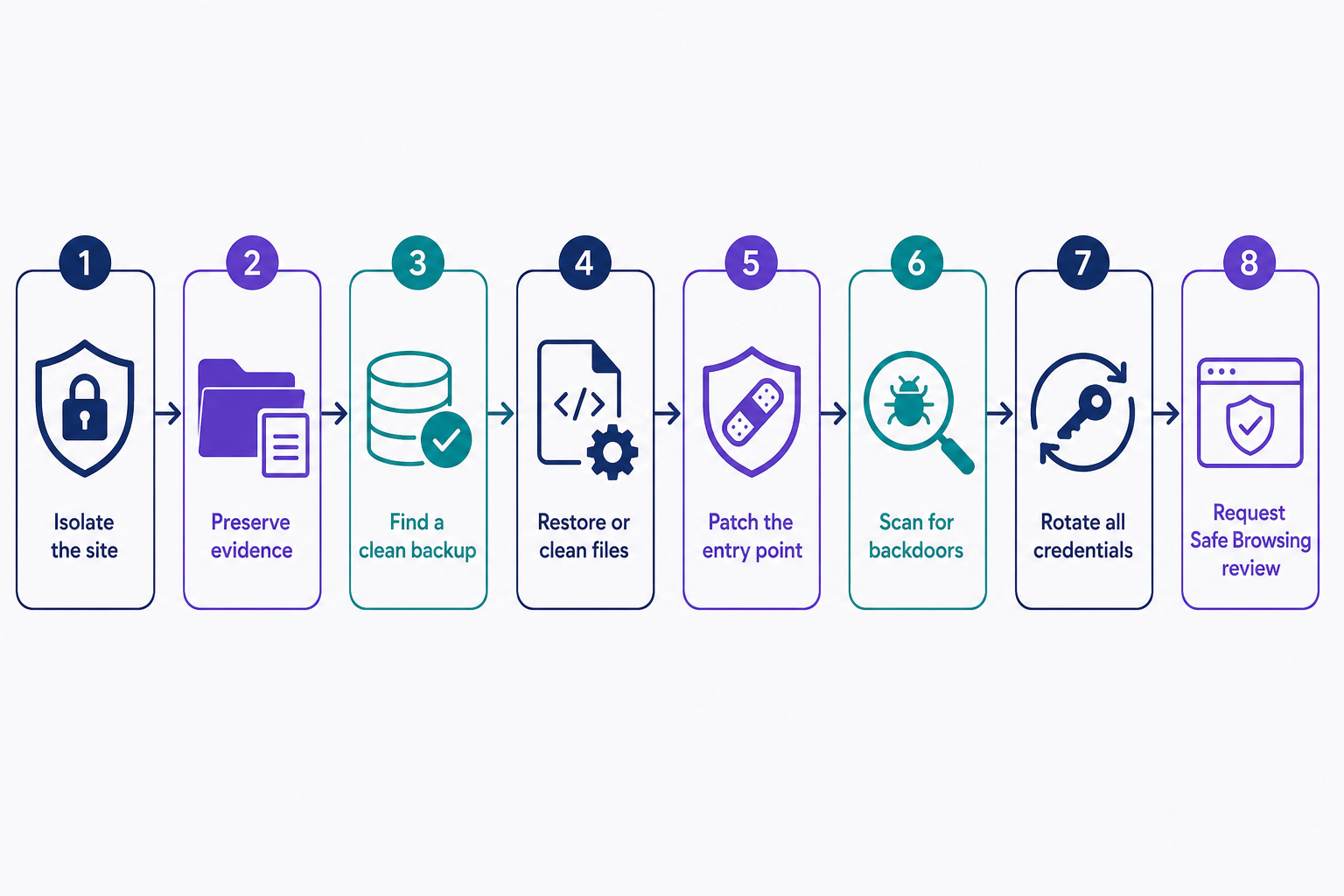
- Isolate the site. Take it fully offline: stop the web server, or have your host serve a 503 page from outside the compromised site, as Google's quarantine guidance recommends. A maintenance-mode plugin isn't isolation: the hacked site keeps running, and it can still expose harmful content to visitors.
- Preserve evidence. Save a snapshot of the infected files and your server logs before changing anything.
- Find a known-clean restore point: a backup from before the compromise.
- Restore that backup, or clean the infected files by hand if no clean copy exists.
- Patch the entry point: update WordPress, all themes, and all plugins so the same hole can't be reused.
- Scan for backdoors, hidden entry points that sidestep normal logins. A malware scan catches what the restore missed (DreamShield is DreamHost's malware-scanning add-on).
- Rotate every credential after restoring: WordPress admin, hosting panel, SFTP, database, and any API keys. Delete any user accounts you didn't create.
- Request a Safe Browsing review in Google Search Console to clear any browser warning.
How to protect your website
Updates are the baseline. Beyond them:
- Use strong, unique passwords and turn on two-factor authentication.
- Limit login attempts to slow brute-force bots.
- Keep regular off-site backups, so recovery never depends on the compromised server.
- Run scheduled malware scans.
- Remove plugins and themes you don't use, so their code can't become an entry point.
For the full checklist, see our guide Everything You Need To Know About WordPress Security.
Frequently Asked Questions
- Yes, almost always. Even without a clean backup, malware can be removed manually or by a professional cleanup service, and Google lifts its Safe Browsing warning after a successful review. You rarely need to rebuild a hacked site from scratch.
- They usually aren't targeting you specifically. Automated bots scan the web for software with known vulnerabilities, not for famous names, so a small site running an outdated plugin is as exposed as a major brand. Any compromised site is useful for sending spam or spreading malware.
- No. An SSL/TLS certificate encrypts traffic between visitors and your server so it can't be read in transit. It doesn't patch vulnerable software, block malware, or stop stolen passwords. A site can serve valid HTTPS and still be hacked.
- Not by itself. Attackers may leave a backdoor, hidden code that sidesteps normal logins so they can get back in without a password. Until you remove every malicious file and update the software they exploited, new passwords won't lock them out.
Powerful WordPress Hosting
Reliable, lightning-fast hosting solutions specifically optimized for WordPress. Find the perfect plan for you by clicking below.
WordPress Hosting Plans