What Is a Navigation Menu?
A navigation menu is the set of links that points visitors to a website’s main pages. Most sites place the primary menu in the header at the top of every page, with secondary menus in a sidebar or footer. A clear menu helps visitors and search engines find content.
More About Navigation Menus
Most websites place the main navigation menu in the header, at the top of every page. That's convention, not accident: Nielsen Norman Group's Menu-Design Checklist (June 7, 2024) lists the header as the expected location for a website's primary menu, and visitors look there first. Many sites also make the header sticky, keeping the menu on screen as visitors scroll so they never have to return to the top.
Menus in the sidebar or footer are secondary: when a header menu is present, they carry the lower-priority links. A typical small-business menu needs only 5 top-level links, something like Home, About, Services, Blog, and Contact, with everything else pushed down to the footer.
Types of navigation menus
Seven patterns cover almost every menu you'll meet:
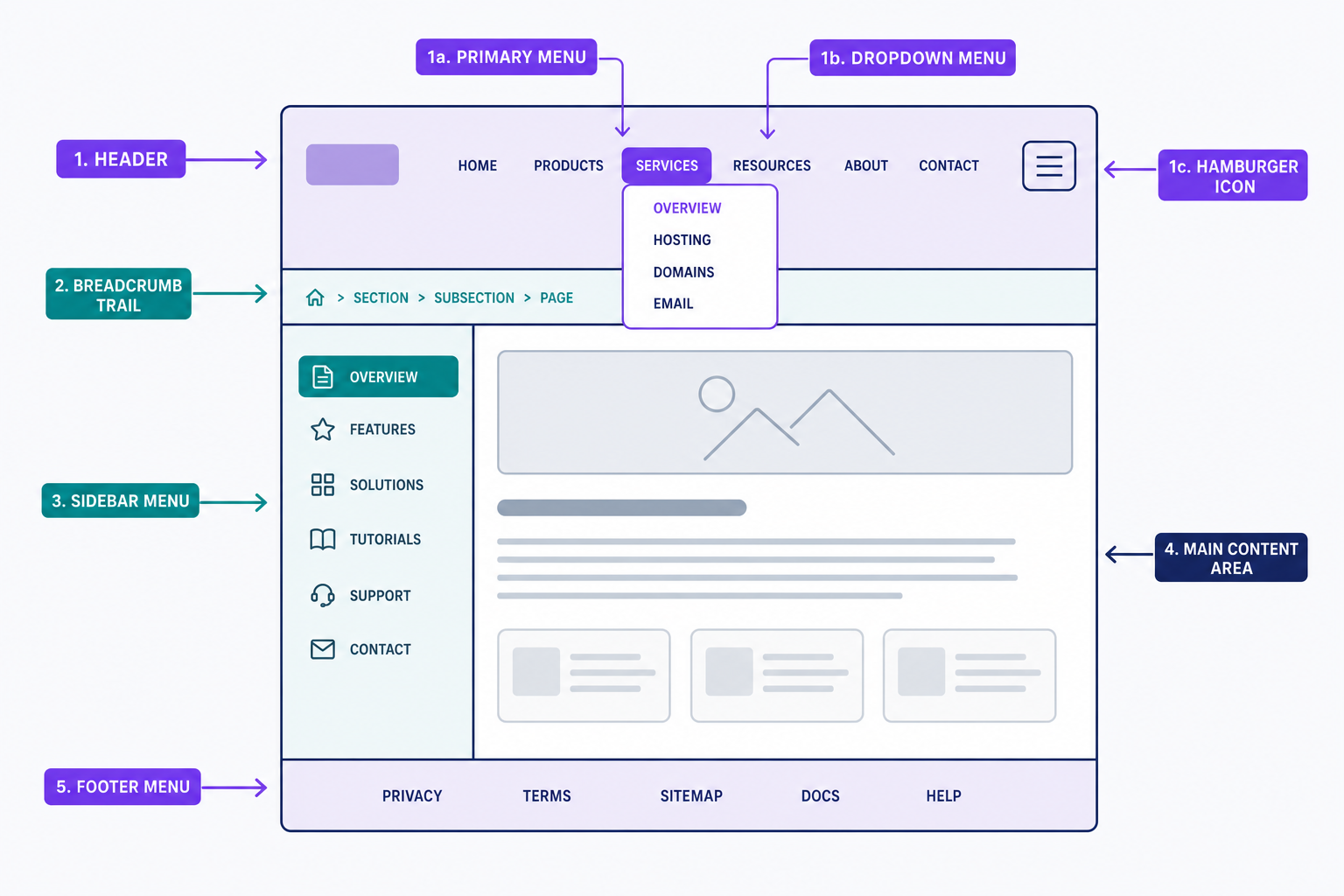
- Horizontal bar: a row of text links across the header. The default, and the right starting point for most sites.
- Dropdown menu: top-level items that expand to show subpages. Hover-only dropdowns fail on touchscreens and for keyboard users, so make each one open on tap or click and by keyboard too.
- Mega menu: a wide panel that shows a whole category tree at once. Built for stores and publishers with many sections.
- Hamburger menu: the three-line icon that hides the menu until it's tapped. Standard on phones and other small responsive layouts; on desktop, keep the menu visible, because hidden menus get ignored.
- Sidebar menu: a vertical list beside the content, common in documentation and web apps.
- Sticky menu: a menu that stays pinned to the top of the screen while the visitor scrolls.
- Footer menu: links at the bottom of every page, for secondary items like privacy policies and careers.
Breadcrumbs aren't a menu, but they work alongside one: a breadcrumb trail shows visitors where the current page sits in the site's hierarchy. For help choosing and combining these patterns, see our guide to website navigation menu best practices, which walks through 16 design tips.
Why your navigation menu matters
A menu decides whether visitors find what they came for. Someone who can't spot the right page rarely hunts for it; they leave. That makes the menu the backbone of your site's navigation and one of the biggest levers you have over user experience.
Search engines read the same links. Because the menu appears on every page, its links are your strongest internal links: they show crawlers how the site fits together and which pages matter most. Google's sitelinks documentation says its systems analyze that link structure to choose the shortcut links clustered under a search result. A page left out of the menu and never linked elsewhere becomes an orphan page that crawlers may never find.
So put your most important pages in the menu, and give each a short, descriptive label. "Pricing" tells a visitor more than "Explore."
Navigation menus in WordPress
Where you edit the menu depends on your theme. Classic and hybrid themes manage menus under Appearance → Menus: create a menu, add pages, drag them into order, and nest items to build dropdowns. Block themes, standard since WordPress 6.0, manage navigation with the Navigation block instead.
Either way, the theme decides where each menu can appear. Assign your main menu to the primary menu location so it shows in the header on every page.
Frequently Asked Questions
- There's no proven magic number. Nielsen Norman Group calls the often-repeated 7-item limit a myth; the right count depends on several factors, not one rule. Many designers keep 5 to 7 top-level links as a practical convention and move everything else into dropdowns or the footer.
- Navigation is the whole system that moves visitors through a website, including menus, breadcrumbs, and in-content links. A navigation menu is one component: the visible list of links, usually in the header. A navbar usually means the horizontal strip that holds that menu.
- Yes. Most sites run several: a primary menu in the header, sometimes a utility menu above it for links like login and search, and a footer menu for policies and support pages. WordPress themes register multiple menu locations, so each area can hold its own menu.
- Yes. Visitors expect the primary menu in the same place on every page, and consistency is how they learn your site. Keep the location, order, and labels identical site-wide, and highlight the current page so people always know where they are.
Custom Website Design
Get a one-of-a-kind, mobile-friendly website that makes your brand truly shine. Share your vision with us and we'll take it from there.
Custom Web Design