What is Infinite Scroll?
Infinite scroll is a web design pattern where a page automatically loads more content as the visitor nears the bottom, so browsing continues without clicking to a next page. It replaces pagination on listing pages and feeds: social networks, news streams, and ecommerce category pages are the most common uses.
More About Infinite Scroll
The goal of infinite scrolling is to keep visitors moving through content on a single page. Because new items load without a click, it reduces interruptions and lowers interaction cost (the effort of pressing a button and waiting for a new page), which Nielsen Norman Group research from September 2022 links to higher engagement.
The most common uses of infinite scrolling are social media feeds (TikTok, Instagram, X), news streams, and ecommerce product lists; blogs also use it to load older posts as you scroll. Even direct competitors split on it: when Nielsen Norman Group reviewed the pattern in September 2022, Nike.com was using infinite scroll on its product listings while Adidas.com stuck with pagination.
How infinite scroll works
JavaScript watches how far down the page you've scrolled. Modern implementations use the browser's IntersectionObserver API to detect when a marker element near the bottom of the list enters your viewport; when it does, the script requests the next batch of items from the server and appends them to the page. A loading animation usually plays while the request completes, and the request typically fires before you reach the actual end, so new items are ready by the time you arrive. In effect, infinite scroll is lazy loading applied to an entire content feed.
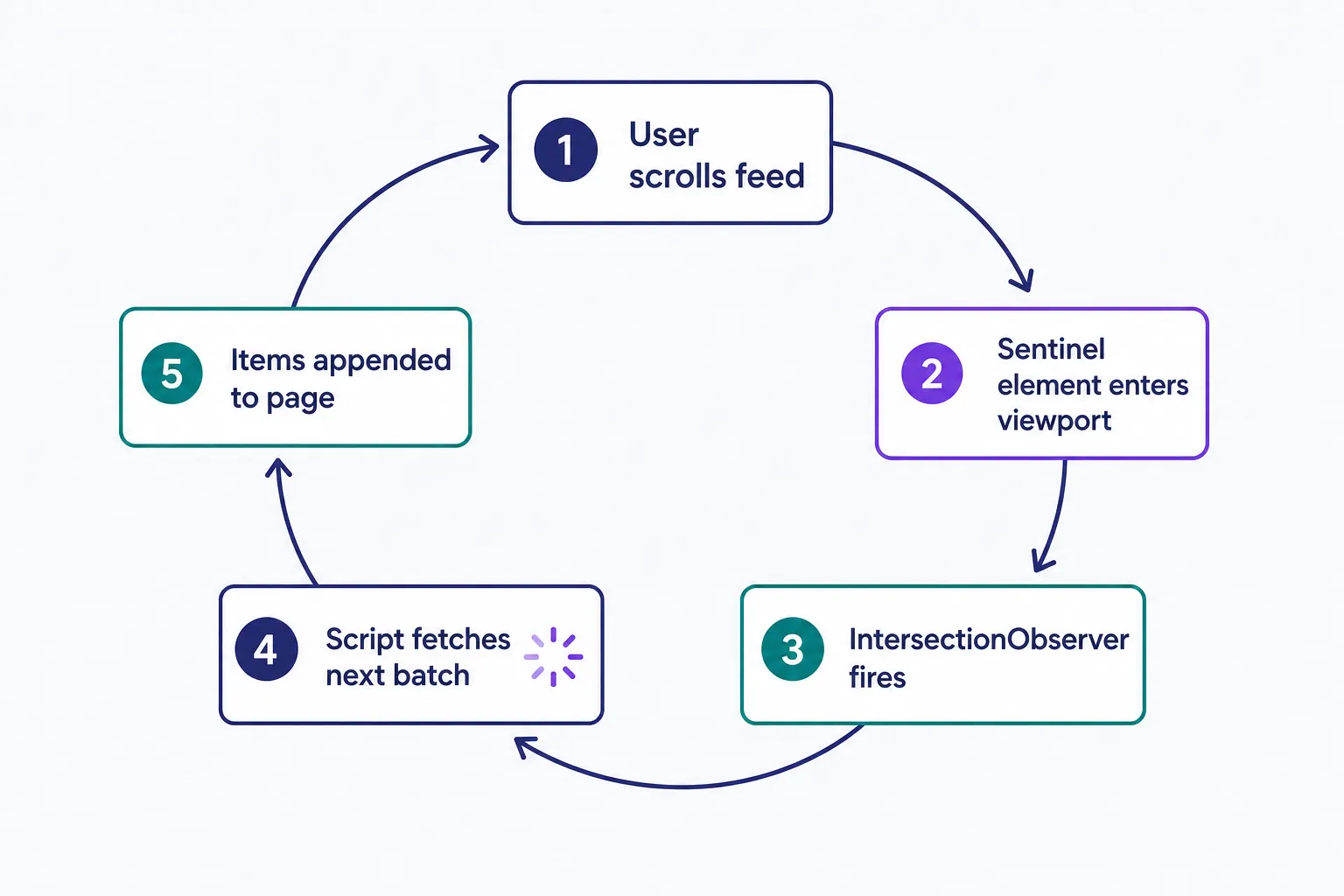
Automatic loading is what defines the pattern. Two related designs are often grouped with it but work differently: a Load More or See More button adds the next batch only when you press it, which makes it incremental loading rather than true infinite scroll, and a stream broken into page landmarks lets you jump between sections instead of scrolling through one endless list. The comparison below shows when each fits.
Infinite scroll vs. pagination vs. Load More
Match the pattern to the visitor's task:
- Infinite scroll suits flat, discovery-driven streams where every item is about equally relevant: social feeds, news, browsing for inspiration.
- Pagination suits goal-driven tasks where people compare items, need to re-find one later, or want a clear end point: search results and filtered product lists.
- A Load More button is the compromise: it keeps scrolling's low interaction cost while restoring the footer and leaving visitors in control of when more content loads.
When in doubt, choose pagination or Load More. Visitors forgive an extra click more readily than a page that won't let them reach the end.
What goes wrong with infinite scroll
Infinite scroll trades control for momentum. The same NN/g research documents 6 recurring problems that hurt user experience:
- Hard to re-find content: the Back button often drops you at the top of the feed, forcing a long scroll back to anything you'd found.
- Illusion of completeness: visitors assume the stream has ended when more content was still loading below the fold.
- An unreachable footer: each new batch pushes footer links further away.
- Accessibility problems: keyboard focus can get lost when new items load, screen readers may not announce that content was added, and links or controls after the feed can become unreachable.
- Increased page load: every appended batch makes the page bigger, so performance can suffer over a long session.
- Poor SEO performance (more on that below).
If you use infinite scroll, save each visitor's spot in the list so the Back button returns them where they left off, and don't bury essential links in the footer. For accessibility, preserve keyboard focus when new items load, announce additions with an ARIA live region, offer a keyboard-operable Load More fallback, and test the feed with keyboard-only and screen-reader navigation.
Is infinite scroll bad for SEO?
It can be. Googlebot doesn't scroll or click the way a person does, so content that appears only after a user action can be invisible to the crawler, and Google's documentation warns that lazy loading done incorrectly "can inadvertently hide content from Google." The fix, per Google's lazy-loading guidance, is to load content whenever it becomes visible in the viewport, without relying on user actions. For feed items, that means JavaScript that watches the viewport, such as the IntersectionObserver API or a library that loads data as it enters view. Browser-native lazy loading helps too, but only for supported media like images and iframes; it can't fetch and append new feed items.
For ecommerce and other listing-heavy sites, Google adds that with incremental loading you "may need to take action to ensure the Google crawler can find all your site content." The reliable pattern is to pair infinite scroll with paginated, individually linkable URLs, so every product or post keeps a crawlable address. Engagement gains mean little if half your catalog never gets indexed.
Frequently Asked Questions
- Typically through a theme option or a plugin: check whether your theme includes an infinite scroll or Load More setting, then search the WordPress plugin directory if it doesn't. Developers can build it with the IntersectionObserver API. Whichever route you take, confirm older posts stay crawlable.
- In 2006, according to Nielsen Norman Group's September 2022 review of the pattern. Its popularity climbed with the rise of smartphones: small screens mean people already scroll constantly, finger ready to swipe, so continuously loading feeds fit mobile browsing naturally.
- Both, in different ways. Google's ecommerce documentation notes that loading a subset of items first makes the initial page load faster and reduces network traffic. But the page grows as each batch is appended, so a long scrolling session gets heavier over time.
Custom Website Design
Get a one-of-a-kind, mobile-friendly website that makes your brand truly shine. Share your vision with us and we'll take it from there.
Custom Web Design