What is localhost?
Localhost is the hostname that refers to the computer you’re currently using. It normally resolves to the loopback IP address 127.0.0.1 in IPv4 and ::1 in IPv6, so traffic sent to it never leaves your machine. Developers use localhost to build and test websites locally before publishing them.
More About localhost
Localhost is the hostname your computer uses to refer to itself: the machine you’re working on right now. The IPv4 address 127.0.0.1 is the standard loopback address, which means any traffic sent to it loops back to your own device instead of going out to the network. In IPv6, the localhost IP address is ::1.
Every computer answers to its own localhost. A site running on your machine at http://localhost is visible only there; a friend typing the same address sees their own machine, not yours.
How localhost works
When you visit a localhost address, your operating system resolves the name itself, normally through its hosts file, rather than sending a query out to the DNS. It then hands the request to the loopback interface, a virtual network connection that routes traffic straight back to your machine. The request never reaches your router or the physical network.
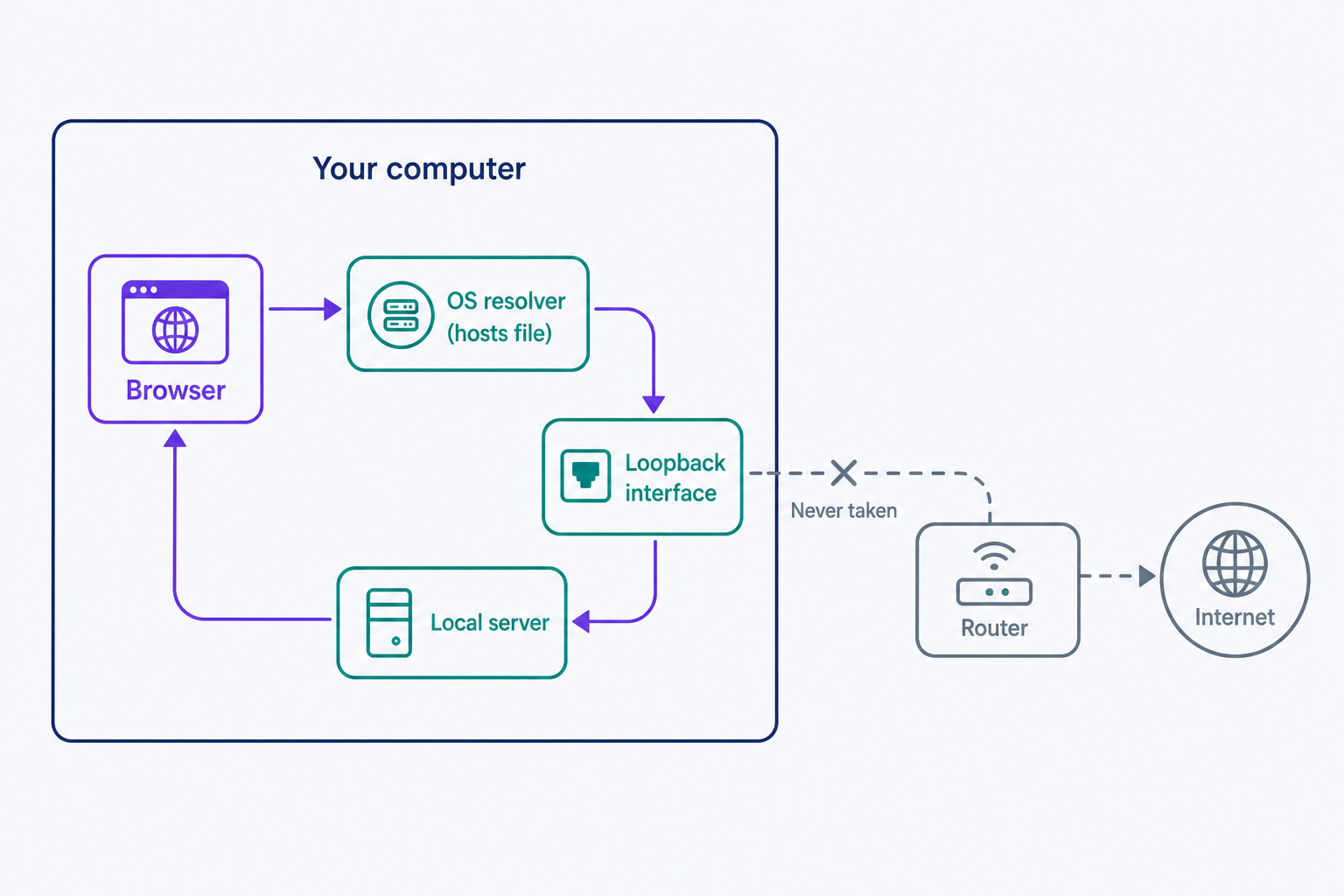
The reservation is bigger than one address. IANA reserves the entire 127.0.0.0/8 block, more than 16 million IPv4 addresses set aside for loopback in September 1981 and documented in RFC 1122, so every 127.x.x.x address loops back, not just 127.0.0.1. IPv6 keeps it simpler with a single loopback address, ::1.
Localhost vs. 127.0.0.1
They usually get you to the same place, but they aren’t the same kind of thing:
- localhost is a reserved hostname, a name your operating system resolves locally.
- 127.0.0.1 is the IPv4 loopback address that name conventionally resolves to.
- ::1 is the IPv6 equivalent, and the only loopback address IPv6 assigns.
In a browser, either form works. Some software treats them differently, though. Unless told otherwise, MySQL on Unix-like systems connects through a local socket file when the host is localhost but uses TCP/IP when it’s 127.0.0.1, so a database that accepts one can refuse the other.
What localhost is used for
The most common use is local development: building and testing a site on your own computer before it goes live. Tools like XAMPP and MAMP install a web server and database on your machine. Start the stack, then browse to http://localhost or to the address the tool reports. Development servers often serve at localhost:8080 or localhost:3000, and the number after the colon is the port.
Localhost also lets programs on one machine talk to each other. When wp-config.php sets the database host to localhost, WordPress looks for its MySQL database on the same server it’s running on. And editing your hosts file to point a domain at 127.0.0.1 sends that domain to your own machine instead of the real site, a quick way to block a distracting site or test a domain locally.
When your local site is ready for visitors, the next step is moving it to a live server. Our beginner’s guide to website staging covers that move.
When localhost won’t connect
If no server is listening at the address and port you typed, the browser shows a connection error. Chrome, for example, says “This site can’t be reached”; other browsers word it differently. The message means nothing answered, not that localhost is broken.
Two checks fix most cases: make sure your local server is actually running, and make sure the port in the URL matches the one the server is using. localhost:8080 fails if your server is on 3000.
Frequently Asked Questions
- No, not by default. Loopback traffic never leaves your machine. Sharing requires your server to listen on the LAN interface (0.0.0.0 or your LAN IP) with its port allowed through the firewall. Do that only on a trusted network or via an authenticated tunnel, then switch back to loopback-only.
- Whatever port your local server listens on. Browsers assume port 80 when you type http://localhost with no port, so localhost:80 and localhost load the same page. If your server starts on another port, like 3000 or 8080, include it after the colon.
- Yes. Loopback traffic is handled entirely inside your operating system and never touches your router or the internet, so you can build and test a local site offline. Only the parts of a site that fetch remote resources, like external fonts or APIs, need a connection.
Web Hosting
Our Web Hosting plans offer a user-friendly interface and flexible options to fit your needs, with a 30-Day Money-Back Guarantee.
Web Hosting Plans