What Is a Domain Transfer?
A domain transfer is the process of moving a domain name’s registration from one registrar to another. The owner starts the transfer at the new registrar and authorizes it with a transfer code from the current one; ICANN rules block transfers within 60 days of registration or a previous transfer.
More About Domain Transfers
Moving a domain between registrars is routine, and the rules around it come from ICANN, the organization that oversees domain registration. Those rules exist to stop domain hijacking, and nearly every quirk below (the locks, the codes, the waiting period) traces back to that goal.
How a domain transfer works
A domain transfer completes when your current registrar releases the domain and the new registrar takes over the registration, including registry data such as your contacts and nameservers. DNS records hosted with your old registrar aren’t copied over automatically, so export or note them before you start. The move itself takes 5 steps:
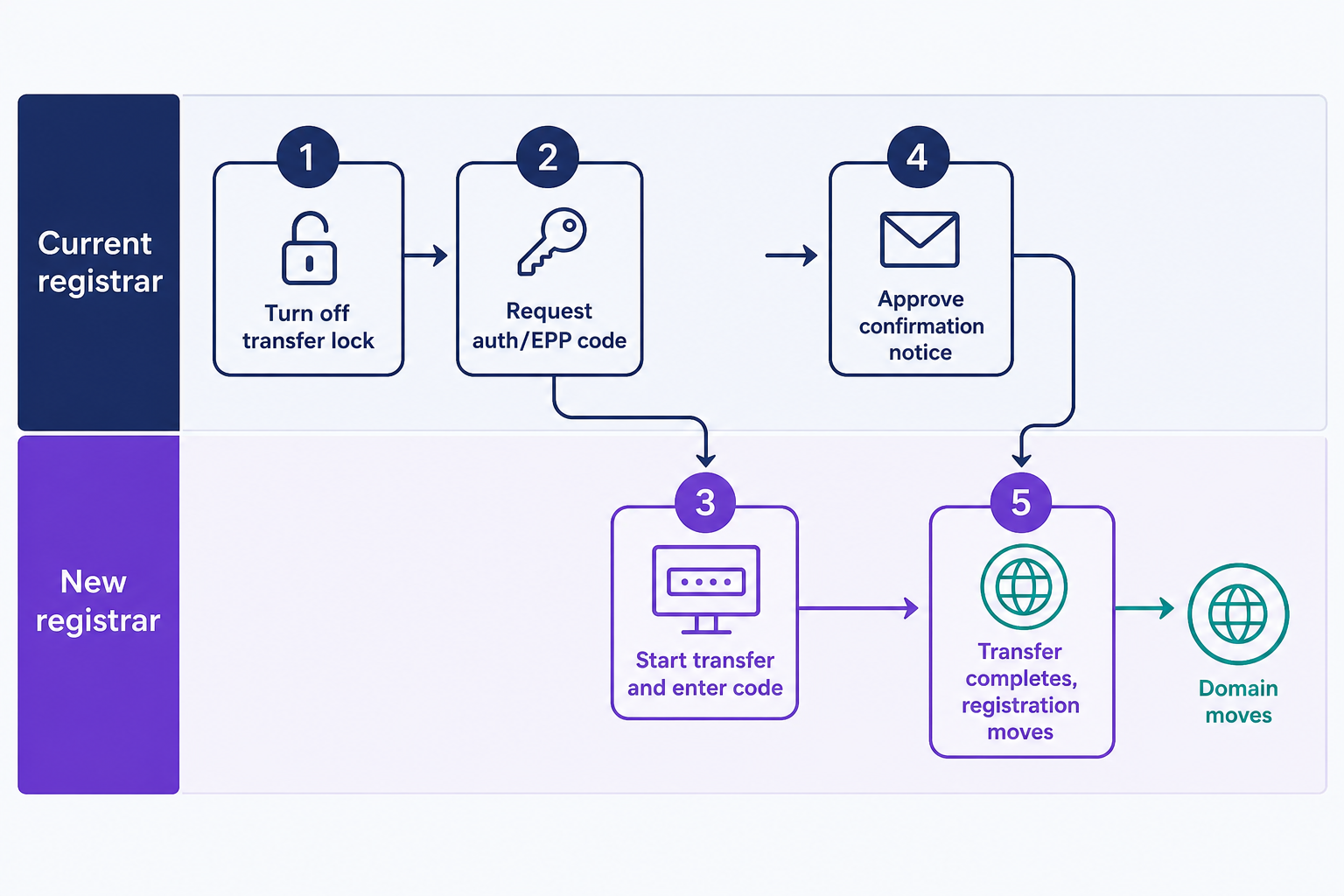
- Turn off the transfer lock at your current registrar. Registrars lock domains by default to prevent hijacking.
- Request the transfer authorization code, also called an AuthInfo or EPP code.
- Start the transfer at the new registrar and enter the code.
- Respond to the confirmation notice if you receive one. Approving it speeds the transfer up; denying it cancels the transfer.
- Wait for completion, typically less than a week.
The code is what authorizes the move, not the confirmation email. If nobody responds to your current registrar’s notice, the registry approves the transfer by default after 5 calendar days, so answering it immediately is the one thing that shortens the wait. Until then, the domain sits in pending transfer status. Under ICANN’s Transfer Policy (updated February 21, 2024, and mandatory for all registrars since August 21, 2025), the registrant, the domain contact listed as the owner, is the only party who can approve or deny a transfer. Older guides say the approval email goes to the domain’s admin contact. That role was retired from the transfer process, and registrars are no longer required to collect one; if your registrar still shows an admin contact, it can’t approve or deny the transfer.
Why a transfer might be blocked or denied
Most failed transfers hit one of three walls. ICANN blocks transfers for the first 60 days after a domain’s initial registration and for 60 days after a previous transfer. The same Transfer Policy requires your registrar to impose another 60-day lock after a change to the registrant’s name, organization, or email address; some registrars offer an opt-out from that contact-change lock, so if you must update your details before moving, check for the opt-out and select it first. And the transfer lock itself has to be off before the new registrar can file the request. Beyond those walls, your current registrar may deny a transfer only for a limited list of valid reasons defined in the policy.
The locks are anti-hijacking safeguards. They give the rightful owner of a stolen domain time to notice the theft before the name changes hands again. Before you start, check the domain’s lock status and registration date in your control panel, and save any other contact edits for after the move.
Cost and what happens to your expiration date
Expect a transfer to cost about a year of registration: most registrars charge a fee tied to a 1-year renewal when the domain arrives. That year isn’t a penalty, because completing a transfer normally extends your expiration date. For generic endings (gTLDs) like .com, ICANN’s rules add 1 year to the existing registration when the transfer completes, up to the 10-year maximum, so the time you already paid for carries over.
One exception: if a domain expires, you renew it at your old registrar, and you then transfer within 45 days of the expiry date, the registry cancels that renewal year and no net time is added. If that’s your situation, wait until 45 days have passed since the expiry date before transferring. Country-code TLDs such as .de set their own rules, so check the registry’s policy before counting on the extra year.
Will your website go down during a transfer?
No, not from the transfer itself. A transfer moves the registration, not your website or email, and your DNS keeps resolving as long as the nameservers stay the same. The real risk is DNS that lives at your old registrar: nothing in the transfer copies those records to your new provider, and some registrars place every incoming domain on their own nameservers. Recreate your DNS records at the new provider (or a separate DNS host) before you start, and visitors will never notice the move.
Domain transfer vs. change of owner vs. changing hosts
People reach for a transfer to do three different jobs, and only one of them actually needs it:
- Domain transfer: moves the registration to a different registrar. The owner stays the same, and so does the website.
- Change of registrant: hands the domain to a new owner. That’s a separate process, and it doesn’t require switching registrars.
- Changing hosts: needs no transfer at all. Point the domain’s nameservers or DNS records at the new host, and the registration stays where it is.
The rule of thumb: transfer when you want a different company managing the registration, whether for a better renewal price or to keep your domains and web hosting under one roof. To switch hosting providers alone, a nameserver update does the job.
Frequently Asked Questions
- From your current registrar. Look for a “transfer out,” “auth code,” or “EPP code” option in the domain’s settings, or ask support to send it to you. Treat the code like a password: anyone who holds it can move your domain to another registrar.
- Yes, until it completes. Deny the confirmation notice from your current registrar and the transfer is canceled. After completion there’s no undo: you’d have to transfer back, and the 60-day post-transfer lock turns that into a 2-month wait.
- Contact your original registrar immediately: registrars can dispute unauthorized transfers with each other under ICANN’s transfer dispute process. If the reverse happens and a registrar improperly denies your transfer, contact the registrar you’re trying to move to for help.
- No. The 60-day locks and confirmation process come from ICANN policy and apply to generic TLDs like .com, .net, and .org. Country-code TLDs such as .uk or .de run their own transfer processes, so check that registry’s rules before you start.
Domain Registration
Search for the perfect domain name and register yours before someone else does! Click below to check availability and see special offers.
Domain Names