The internet is facing an IP address crisis.
The short answer: IPv4 uses 32-bit addresses, which allow about 4.3 billion unique addresses. IPv6 uses 128-bit addresses, which allow about 340 undecillion. IPv6 also gives every device its own globally routable address (no NAT workarounds), builds IPsec security into the protocol suite, and uses simpler fixed-size headers that routers process faster.
When IPv4 was created in the 1980s, it was designed to give each computer connected to the internet an IP address.
IP Address
An IP address is a unique numerical identifier for devices on a network. It shows where a device is located and facilitates communication between devices using network protocols.
Read MoreHowever, there can only ever be 4.3 billion unique IPv4 addresses, and we already have eight billion people.
And that’s a problem.
We still heavily rely on IPv4, a system that is exhausted and running on workarounds. Roughly half of the users reaching Google still connect over IPv4 (per Google’s IPv6 statistics, August 2026).
Thankfully, IPv6 was built to solve this.
IPv6 offers a virtually limitless address space, with 340 undecillion addresses.
Currently, roughly 50% of users access Google using an IPv6 address. Native IPv6 access crossed 50% for the first time on March 28, 2026 (per Google’s IPv6 statistics). Many countries, such as France (73%), India (72%), and Saudi Arabia (65%), according to Internet Society Pulse (April 2026), are already adopting IPv6 on a large scale.
But why hasn’t everyone jumped onto this technology? And what are the fundamental differences between these two competing systems?
Let’s explore the differences between IPv4 vs. IPv6 — the internet’s present and future.
What is IPv4?
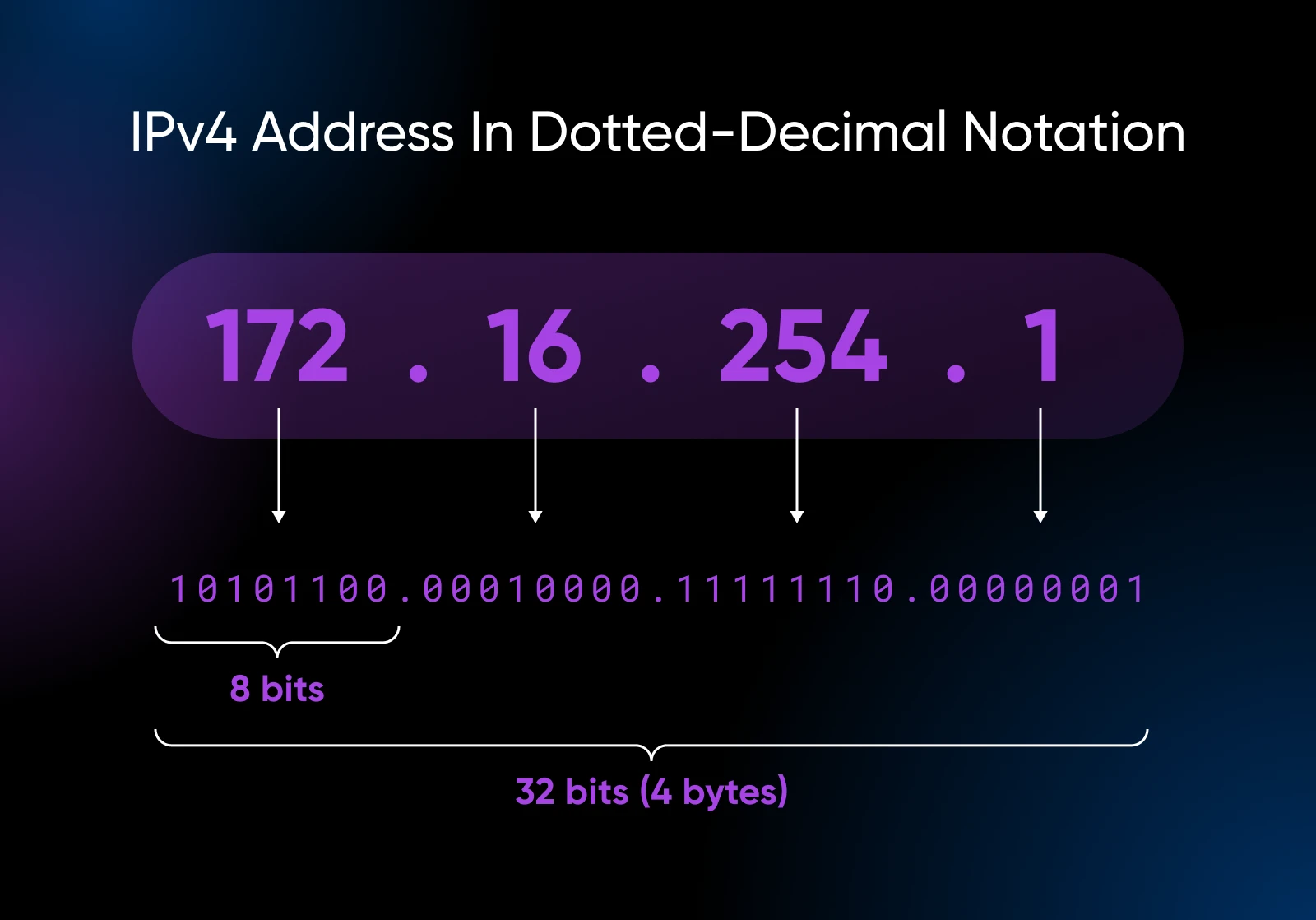
Internet Protocol version 4 (IPv4) is the veteran system of the internet. Since its introduction in the early 1980s, IPv4 has reliably delivered data packets (your emails, messages, videos, etc.).
But IPv4 uses 32-bit addresses, which look like this: 192.168.0.1.
Each number, separated by dots, can range from 0 to 255.
This gives us almost 4.3 billion unique addresses.
It was more than enough for the early internet but isn’t even close to enough today.
Think about it: we are 8+ billion people on Earth, and many of us have multiple devices connected to the internet. If we give every smartphone, laptop, and smart refrigerator an IPv4 address, there just wouldn’t be enough IPv4 addresses.
This shortage is a significant reason why an upgrade became necessary.
Private and reserved IPv4 addresses
Not every IPv4 address is reachable on the public internet. Engineers write blocks of addresses in CIDR (“slash”) notation: an address plus a prefix length. For example, 192.0.2.0/24 means the first 24 bits identify the network, covering the 256 addresses from 192.0.2.0 through 192.0.2.255.
Several of these blocks are reserved for special uses. The ranges 10.0.0.0/8, 172.16.0.0/12, and 192.168.0.0/16 are set aside for private networks (which is why your home router hands out addresses like 192.168.0.1), and 127.0.0.1 is the loopback address a device uses to talk to itself.
That’s also why the example address above can’t be reached from the internet: it exists only inside your local network, behind your router.
What is IPv6?
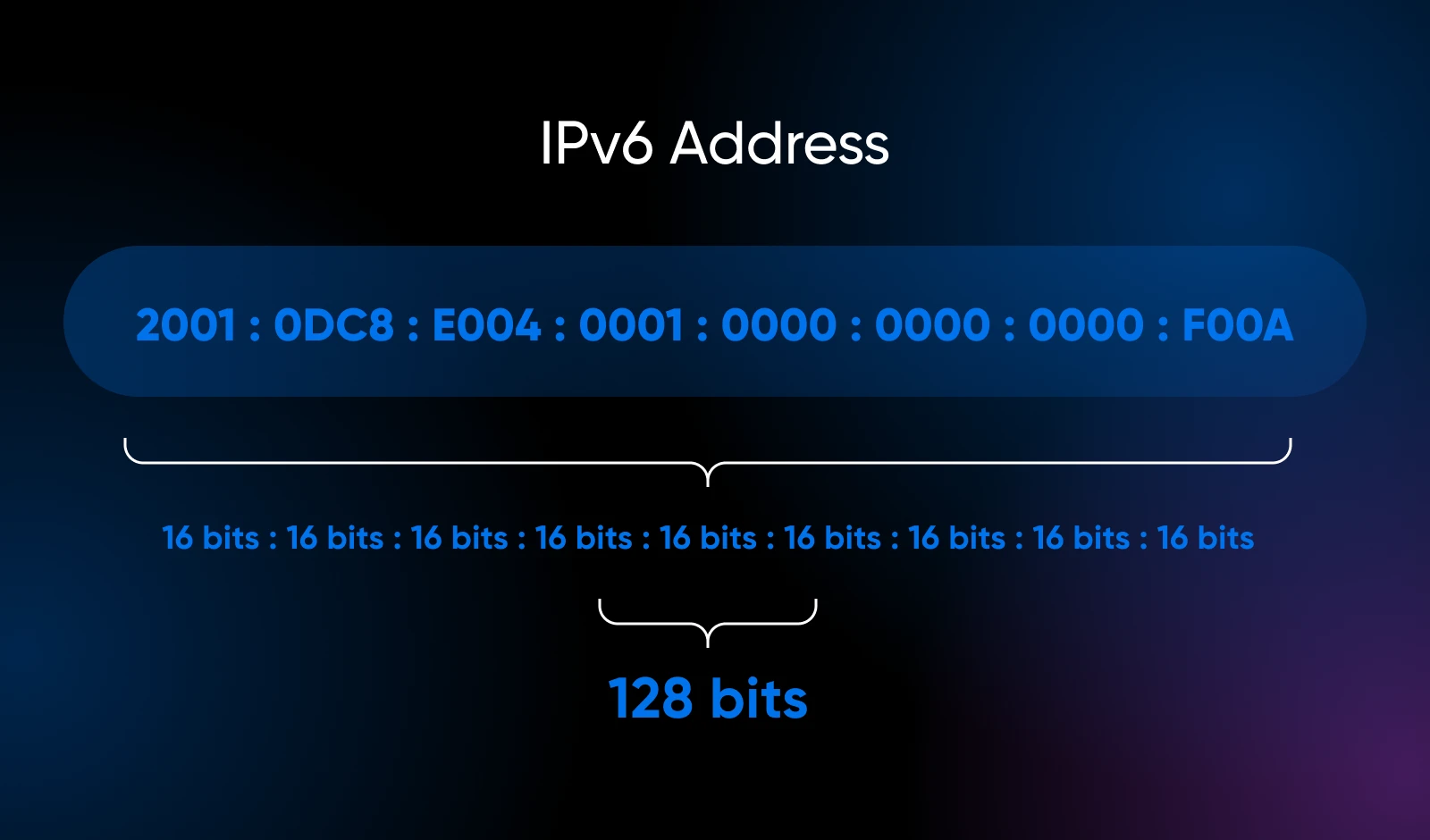
IPv6 (Internet Protocol version 6) is the most recent version of the Internet Protocol, and the successor to IPv4. It uses 128-bit addresses, which means roughly 340 undecillion unique addresses — enough for every device on Earth to get its own globally routable address.
Developers started creating IPv6 in 1994 to address the potential exhaustion of available addresses. Back then, it seemed like a complex overkill since we did not expect the internet to expand so quickly.
Now, IPv6 is a necessity.
IPv6 uses 128-bit addresses, providing an astronomically humongous address space of approximately 340 undecillion (2128 or 3.4×1038 — written out, that’s 340,282,366,920,938,463,463,374,607,431,768,211,456) unique addresses.
To grasp the enormity of the IPv6 address space, let’s consider some comparisons:
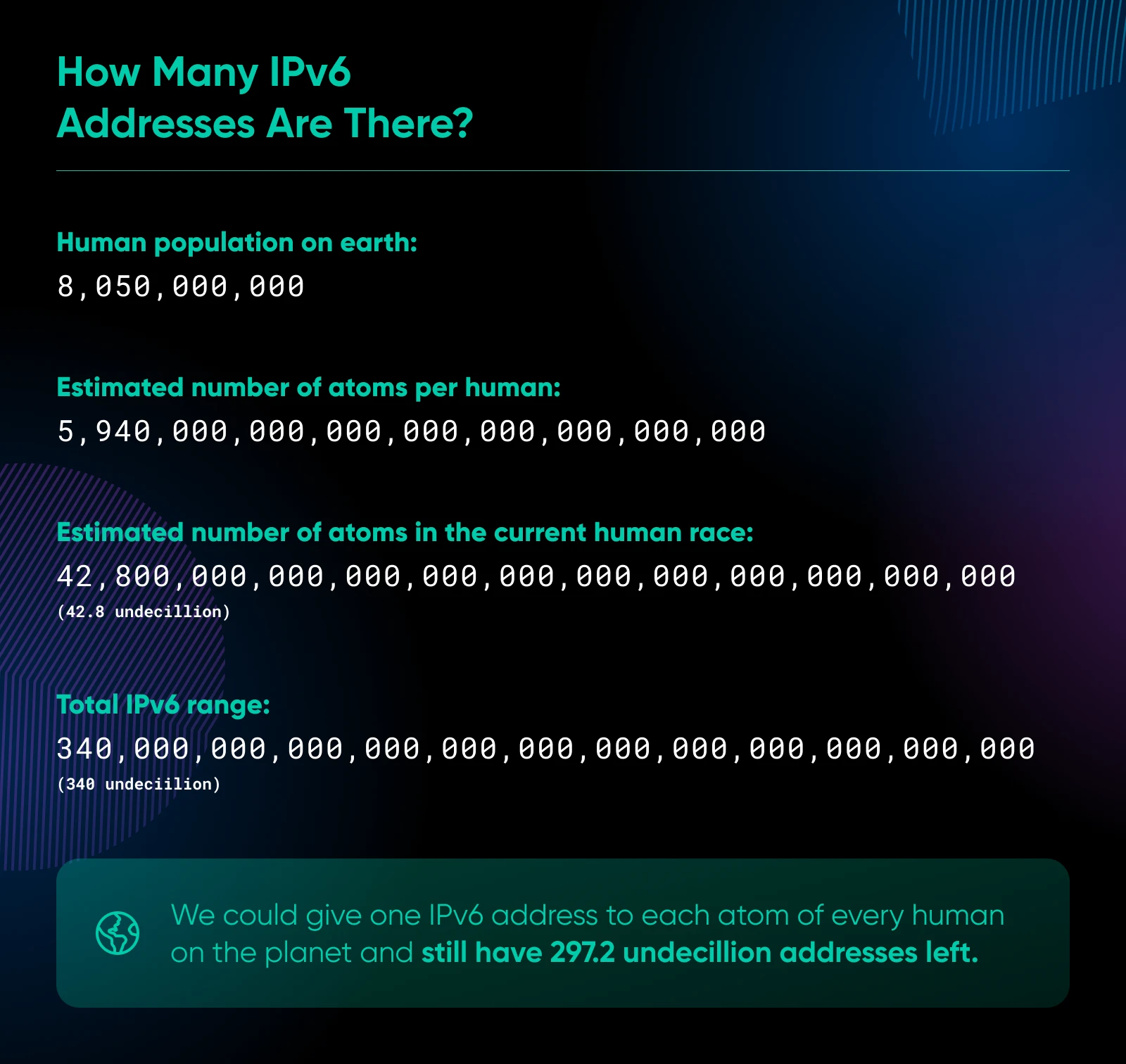
- There are about 8.3 billion people on the planet (2026). IPv6 can provide about 41 octillion (4.1×1028) unique addresses for every person on Earth at the current population level.
- There are more IPv6 addresses than there are grains of sand on Earth (estimated to be around 7,500,000,000,000,000,000 or 7.5×10¹⁸).
- The number of IPv6 addresses is greater than the number of stars in the observable universe (estimated to be around 7×10²²).
While the IPv6 address space may seem excessive, it provides ample room for future growth and eliminates the need for address conservation techniques like Network Address Translation (NAT). We’ll circle back to that in just a minute.
As the Internet of Things (IoT) continues to expand, having a vast address space ensures that we won’t face address exhaustion issues for a very long time.
Where is IPv5?
You may be wondering why we jumped from IPv4 to IPv6, skipping version 5.
IPv5 is associated with an experimental data-streaming protocol called Internet Stream Protocol (ST).
ST stayed a data-streaming experiment that broadband eventually made unnecessary, and the industry skipped IPv5 entirely, moving directly from IPv4 to IPv6.
Why can’t we continue using IPv4 like we already do?
Because we’re out of IPv4 addresses.
Back in 2011, the Internet Assigned Numbers Authority (IANA) handed out its last IPv4 address blocks to the Regional Internet Registries (RIRs). These RIRs stretched their remaining pools for years, but all five have since run out of their general free pools. APNIC was the first RIR to run dry, in April 2011, and RIPE NCC, the last with a general pool, made its final /22 allocation on November 25, 2019. New IPv4 space now comes only from waiting lists, recovered addresses, and the transfer market.
This isn’t a new problem.
In June 1992, the internet’s unexpected exponential growth resulted in the publication of RFC 1338, Supernetting: an Address Assignment and Aggregation Strategy. This memo was the first to discuss the consequences of the “eventual exhaustion of the 32-bit IP address space.”
Two years later, RFC 1631, The IP Network Address Translator (NAT), was published.
Understanding why we still have functional internet requires understanding the concepts and technicalities involved in routing and networking.
To put it simply, we currently share and reuse IPs whenever possible through technologies like Carrier-Grade NAT (CGN).
Here’s a simplistic overview of CGN and why it is becoming a problem:
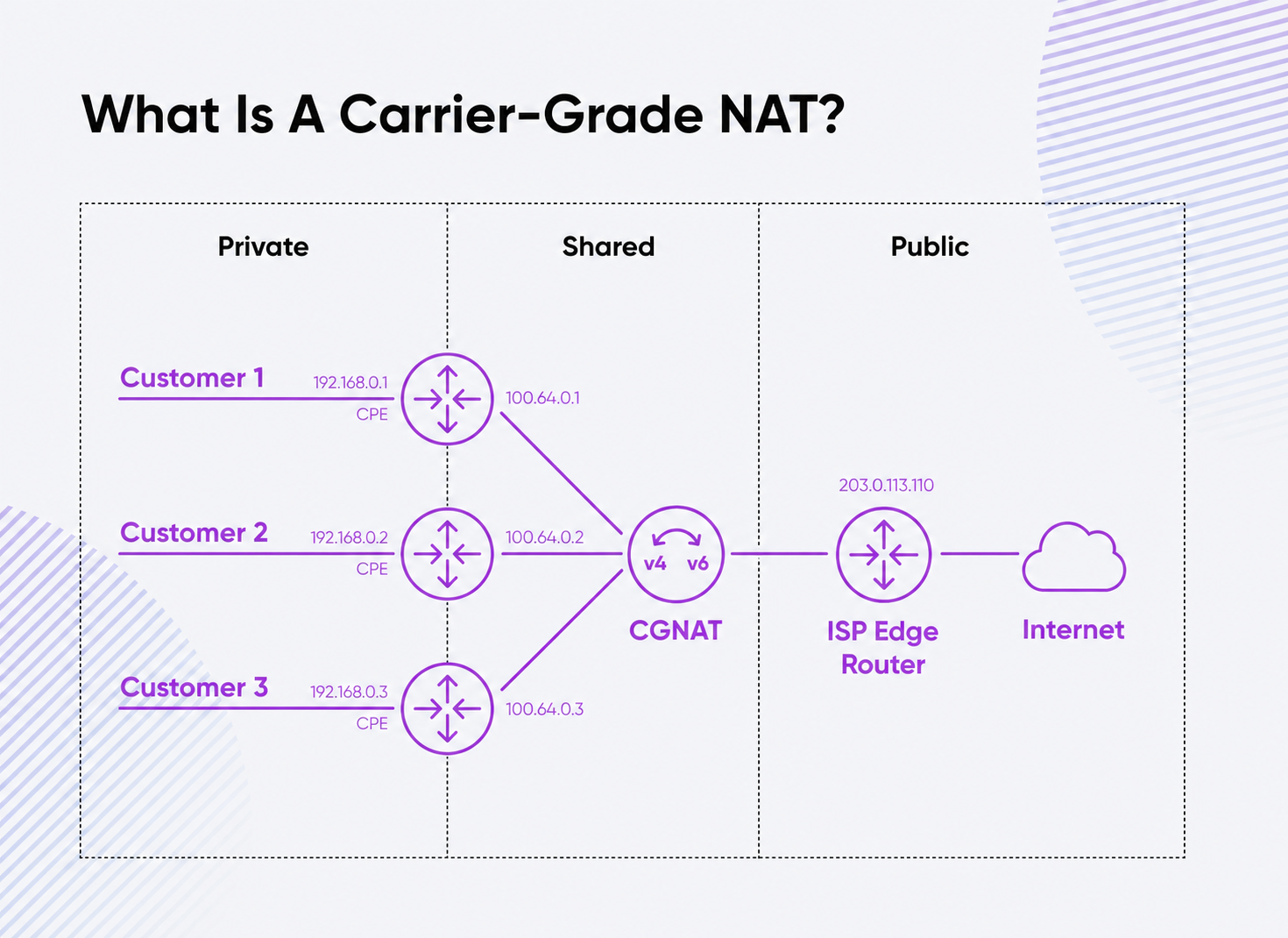
Say you have one router at home (suppose this is your Wi-Fi router), which has one global IP address.
When you connect a device to your Wi-Fi, the router assigns you a local IP while your global IP address remains the same as your router’s.
All your internet requests, such as those when watching Instagram Reels, YouTube videos, or reading this blog, are sent through your router and the single global IP.
Now, if your router is inactive at night, your internet service provider (ISP) will reassign your IP address to someone who wants to use the internet.
If you think about it, you’ll see how this becomes a problem as more devices connect to the internet and require 24/7 access, like your voice assistants (Amazon Echo Dot, Google Home, Apple Home, etc.) or your security cameras.
While CGN can help, it also introduces new problems: network performance dips, routing complexities, and issues for applications needing a direct connection between users.
IPv6 directly addresses these concerns with a massive address space. Since IPv6 allows a true end-to-end connection, there will be no more sharing. It also comes with improved security, simpler network setup, and better support for mobile devices.
How bad is the IPv4 shortage?
ISPs and their customers have been worried about the shortage of IPv4 addresses for years, as evidenced by this ServerFault user’s post. To work with the available pool of IPv4 addresses, network providers do the following:
- ISPs repeatedly shuffle IPv4 blocks between cities, which causes brief outages and connection resets for customers.
- To conserve addresses, the DHCP lease times have been shortened from days to minutes. This means that if your router is inactive for a couple of minutes, the ISP will assign your IP to someone else.
- Enabling NAT on customer-premises equipment (CPE), even for customers who had opted out because there were no IPs left.
- Limiting the number of devices that can connect to a network at the same time by using MAC address restrictions.
- Deploying carrier-grade NAT (CGN) for customers who previously had an actual IP address.
The problem? These measures reduce the quality of service for ISP customers.
The fragmentation of the IPv4 address space has also led to administrative overhead, increased costs, and even outages due to the limitations of content addressable memory (CAM) capacity on backbone routers. Scarcity has a literal price tag, too: IPv4 addresses now change hands on a secondary transfer market, with recent sales running roughly $13–$26 per address (per broker IPv4.Global’s published sales data, 2026).
While NAT has been a temporary solution to the IPv4 address shortage, it is becoming increasingly insufficient.
ISPs already have multiple layers of NAT, which results in less reliable connectivity and network problems that become extremely difficult to identify and debug.
IPv4 vs. IPv6: What’s the difference?
We’ve discussed the need for IPv6 and its adoption rates. Now, let’s directly compare IPv4 vs. IPv6.
Number of available addresses
IPv4 uses 32-bit addresses, while IPv6 uses 128-bit addresses. This difference significantly impacts the number of addresses available:
| IPv4 | IPv6 | |
| Address length | 32 bits | 128 bits |
| Unique addresses | ~4.3 billion | ~340 undecillion |
| Address format | Dotted decimal (e.g., 192.0.2.1) | Hexadecimal (e.g., 2001:0db8:85a3:0000:0000:8a2e:0370:7334) |
IPv6’s larger address space eliminates the need for NAT. With IPv6, each device receives its own unique, globally routable address, simplifying network configurations and allowing direct connections.
To put this in perspective, we would run out of IPv4 addresses if we tried to assign one to each of the eight billion people on Earth.
However, we’d need to assign roughly 41 octillion addresses per person on Earth to run out of IPv6.
Packet header structure
IPv4 and IPv6 packets are like envelopes that carry data across the internet.
Just like envelopes, they have a header that contains important information for delivery. However, IPv4 and IPv6 have different header designs:
| IPv4 | IPv6 | |
| Header size | Variable (20–60 bytes) | Fixed (40 bytes) |
| Header fields | 13 (including checksum) | 8 |
| Header checksum | Yes | No |
| Fragmentation | Allowed by source and routers | Allowed only by the source |
IPv4 headers are like envelopes with variable sizes. They have 12 fields of information and a checksum, which helps ensure the contents haven’t been tampered with.
IPv4 also allows both the sender and the post office (routers) to break down large packets into smaller pieces if needed.
On the other hand, IPv6 headers are like standardized envelopes with a fixed size. They have only eight fields of information and no checksum. IPv6 only allows the sender to break down large packets, not the post office (router).
This simplified structure offers advantages:
- Faster processing: With fewer fields and a fixed size, the post office can sort and deliver IPv6 packets more quickly, reducing delays and improving overall network speed.
- More efficient forwarding: Since IPv6 doesn’t have a checksum, the router doesn’t need to verify the seal at each stop, which speeds up the delivery process. Also, since the packets can only be broken down by the sender, the routers only need to forward them.
- Better support for add-ons: IPv6 has special headers that can be attached to the main envelope, allowing for efficient addition of new features like security, mobility, and priority handling.
Security
| IPv4 | IPv6 | |
| IPsec support | Optional (retrofit) | Integrated into the spec; support recommended (SHOULD, per RFC 8504), not mandatory |
| Privacy extensions | Not available | Available |
IPv6 integrates IPsec, a set of protocols that encrypt, authenticate, and protect IP packet integrity, into the protocol suite. Since RFC 6434 (2011), implementing IPsec has been recommended (a “SHOULD,” retained by RFC 8504) rather than mandatory, and it secures traffic only when it’s actually used. When it is, it reduces the risk of snooping and data alteration.
IPv6 also includes privacy extensions that let devices generate randomized addresses, making it more challenging for attackers to track individual devices across different networks.
IPsec’s integration with IPv6 delivers several advantages:
- Confidentiality: IPsec encrypts the data within IP packets, protecting it from unauthorized access.
- Improved integrity: IPsec’s data integrity checks prevent tampering, guaranteeing data arrives at its destination intact.
- Authentication: IPsec enables mutual authentication between the sender and receiver, verifying their identities and stopping spoofing attacks.
IPv6’s privacy extensions also tackle a potential concern with stateless address autoconfiguration (SLAAC).
A device can create an IPv6 address using its MAC address when connecting to a network. However, since the MAC address doesn’t automatically change, the device can be tracked across different networks.
Privacy extensions solve this by letting devices generate random IPv6 addresses that change periodically, making it harder to track a device and improving user privacy.
Quality of Service (QoS)
Quality of Service (QoS) is a way to prioritize certain types of internet traffic over others. This is important for things like video calls or online gaming, where the data needs to arrive quickly and smoothly without delays or interruptions.
IPv4 and IPv6 have different ways of handling QoS:
| Feature | IPv4 | IPv6 |
| QoS mechanism | Type of Service (ToS) field | Flow Label field |
| Field length | 8 bits | 20 bits |
IPv4 has a small “Type of Service” field to prioritize traffic, but it’s limited to just 8 bits.
IPv6 introduces a larger “Flow Label” field, which allows better traffic labeling and prioritization.
This helps the network identify important data, like video calls or gaming, and provides better performance and stability, even during network congestion.
Multicast
Multicast is a way to send data to many devices at the same time, which is useful for things like video streaming or online gaming. IPv4 and IPv6 handle multicast differently.
| Feature | IPv4 | IPv6 |
| Multicast address range | 224.0.0.0/4 | ff00::/8 |
| Multicast address assignment | IANA-assigned | Automatically assigned |
In IPv4, IANA assigns a limited number of multicast addresses in the 224.0.0.0/4 range.
IPv6 has a much larger pool of these addresses and lets devices assign these addresses to themselves automatically. This makes it easier to use multicast for things like streaming video to many people simultaneously.
IPv6 also has special “solicited-node” addresses that every device gets automatically. These help devices find each other on the network and avoid address conflicts, making the network run more smoothly.
DNS support
The Domain Name System (DNS) is like a phone book for the internet. It translates the website names you type into your browser (like www.example.com) into the specific IP addresses that computers use to find each other.
| Feature | IPv4 | IPv6 |
| DNS record type | A | AAAA |
| Reverse DNS record type | IN-ADDR.ARPA | IP6.ARPA |
| DNS server address | IPv4 address | IPv6 address |
The key differences in DNS support between IPv4 and IPv6 include:
- IPv6 addresses are stored in AAAA records (pronounced “quad-A”), which are the equivalent of A records in IPv4.
- IPv6 uses the IP6.ARPA domain for reverse DNS lookups, while IPv4 uses IN-ADDR.ARPA.
- DNS servers must have IPv6 addresses to be accessible over IPv6 networks.
For a smooth switch to IPv6, DNS servers and programs need an update to understand both IPv4 and IPv6 records. This allows both types of addresses to work together during the changeover.
IPv6 in the Internet of Things (IoT)
IPv6 is important for the “Internet of Things” (IoT), which refers to all the various devices that connect to the internet, like smart home gadgets and industrial equipment. Here’s how IPv6 compares to IPv4 for IoT:
| Feature | IPv4 | IPv6 |
| Address space | Limited (4.3 billion) | Virtually unlimited (340 undecillion) |
| Address assignment | Requires DHCP or manual configuration | Supports stateless address autoconfiguration (SLAAC) |
| Multicast support | Limited | Enhanced |
IPv6 offers several benefits for the IoT:
- Address availability: IPv4 has a limited number of addresses (4.3 billion), while IPv6 has a vast number (340 undecillion). This means IPv6 can support many more IoT devices than IPv4.
- Setup: IPv4 requires manual setup or DHCP for address assignment, while IPv6 allows devices to create their addresses automatically (SLAAC). This makes IPv6 simpler for setting up IoT devices.
- Communication: IPv6 has better multicast features than IPv4, allowing more efficient communication between IoT devices and controllers.
- Security: IPv6 integrates IPsec into the protocol suite (support is recommended for all IPv6 nodes), giving IoT deployments a standard path to encrypted transport, though traffic isn’t encrypted by default.
As the number of IoT devices grows, IPv6 will become increasingly important due to its larger address space, simpler setup, improved communication, and better security compared to IPv4.
How to decide: IPv4 vs. IPv6
While all devices will continue to remain backward compatible with IPv4 for the foreseeable future, it makes sense to take a few steps toward transitioning to an IPv6 network. To help you decide, here’s a summary of all the differences between IPv4 and IPv6 that we’ve covered above:
| IPv4 | IPv6 | |
| Address length | 32 bits | 128 bits |
| Unique addresses | ~4.3 billion | ~340 undecillion |
| Address format | Dotted decimal (192.0.2.1) | Hexadecimal (2001:0db8:85a3::8a2e:0370:7334) |
| Header | Variable (20–60 bytes), with checksum | Fixed (40 bytes), no checksum |
| IPsec | Optional retrofit | Integrated into the protocol suite (support recommended) |
| QoS | 8-bit Type of Service field | 20-bit Flow Label field |
| DNS record type | A | AAAA |
| Needs NAT? | Yes, to stretch scarce addresses | No, every device gets a globally routable address |
Scan the table for the quick answer, then weigh the trade-offs below.
Benefits of IPv4
IPv4, the established standard, boasts near-universal compatibility with existing devices and networks. Network administrators’ familiarity with IPv4 can simplify day-to-day management. Years of use have led to the development and widespread adoption of security protocols like IPsec and SSL/TLS, enhancing its security.
Benefits of IPv6
IPv6, on the other hand, offers a vastly larger address space thanks to its 128-bit addresses, a solution to the increasing number of internet-connected devices. Network setup and management are more straightforward with IPv6’s SLAAC and better multicast support.
Security benefits from IPsec being integrated into the IPv6 suite (support is recommended for all IPv6 nodes), reducing eavesdropping and tampering risks when it’s used. IPv6’s Flow Label field allows for better traffic prioritization, which is perfect for today’s needs like video conferencing.
Practical considerations
Organizations should consider several practical factors when contemplating a shift from IPv4 to IPv6. The primary consideration is compatibility.
Most modern devices and software handle IPv6 without issue. However, some legacy systems might not. Assess your hardware and software to determine whether migration is possible or if it would require a hardware upgrade.
Any migration incurs costs either because of the hardware upgrades or because of the time invested, and moving to IPv6 is no different.
Think of the hardware, software, and training costs against the long-term advantages of adopting IPv6.
Note: During the transition, both protocols will coexist on your network, and in fact, you will need a backward-compatible system while the internet is still transitioning to IPv6.
How the transition actually works
Here’s the key fact: IPv4 and IPv6 aren’t directly interoperable. An IPv4-only device can’t talk to an IPv6-only device without a translator in between. Three technologies bridge the gap:
- Dual stack: A device runs both protocols side by side and uses whichever one the destination supports. This is the most common approach today.
- Tunneling: IPv6 packets travel wrapped inside IPv4 packets (or the reverse) to cross networks that only speak the other protocol.
- NAT64/DNS64: A gateway translates between the two address formats so IPv6-only devices can still reach IPv4-only servers.
In practice, dual stack keeps everything reachable while the internet finishes the move.
What’s the best choice between IPv4 and IPv6?
The choice of IPv6 adoption rests on your current setup. If your organization is running out of IPv4 addresses, needs advanced features like better multicast support, or simply wants to future-proof its networks, then transitioning to IPv6 is definitely something to consider.
For home users, two quick verdicts. Is IPv6 faster? Not noticeably. It trims some NAT overhead, but for everyday browsing the difference is rarely measurable. Should you disable it? No: leave IPv6 enabled. Modern routers and operating systems handle it well, and turning it off can break apps that expect it; disable it only to troubleshoot a specific issue.
Also, looking back at the differences between IPv4 and IPv6, IPv6 is the more appropriate choice for today’s internet. It was made for a world with virtually unlimited devices, all needing to connect reliably and securely, while IPv4 was not.
But you can be ready for this change. For your own website, getting IPv6-ready takes three quick checks:
- Test your connection: Visit test-ipv6.com to see whether your network already reaches sites over IPv6.
- Check your host: Confirm your hosting provider can assign your site an IPv6 address.
- Add an AAAA record: Once your site has an IPv6 address, publish it in DNS as an AAAA record so IPv6 visitors can find you.
You don’t need to migrate overnight. Keep IPv4 running, enable IPv6 alongside it, and confirm your host and DNS support both — that’s the whole transition plan for most sites.
Looking for a partner to help you step into the future of the internet?
Find a hosting provider that understands the importance of IPv6. DreamHost, for example, has solid IPv6 support, so you’ll be prepared for what’s next.
IPv4 isn’t going away tomorrow, so there’s no need to panic-migrate. Enabling IPv6 alongside it now, though, is cheap future-proofing.
IPv4 vs. IPv6 FAQs
Is IPv6 faster than IPv4?
Not by much. IPv6 removes NAT overhead and can trim latency slightly on well-configured networks, but for everyday browsing the difference is rarely noticeable. The reason to adopt IPv6 is address space, not speed.
Can IPv4 and IPv6 work at the same time?
Yes. Most networks run dual stack, where each device holds both an IPv4 and an IPv6 address and uses whichever one the destination supports. The two protocols can’t talk to each other directly, so dual stack, tunneling, or NAT64 translation bridges them.
How many IPv6 addresses are there?
About 340 undecillion: 2128, or 340,282,366,920,938,463,463,374,607,431,768,211,456 addresses. That works out to roughly 41 octillion addresses for every person on Earth.
Do I need to switch to IPv6?
Not urgently — IPv4 will keep working for years. But confirm that your devices, your hosting provider, and your domain (via an AAAA record) support IPv6 so visitors on IPv6-only networks can reach you.
Why was IPv5 skipped?
Version 5 is associated with the Internet Stream Protocol (ST), an experimental data-streaming protocol that broadband eventually made unnecessary. The industry skipped it and moved directly from IPv4 to IPv6.

Your Great Idea Starts with a Domain Name
A custom domain gives your site a professional look, strengthens your brand, and helps visitors find you on the web.
See MoreDid you enjoy this article?
