
Google reCAPTCHA went paid — Cloudflare Turnstile is the best free alternative
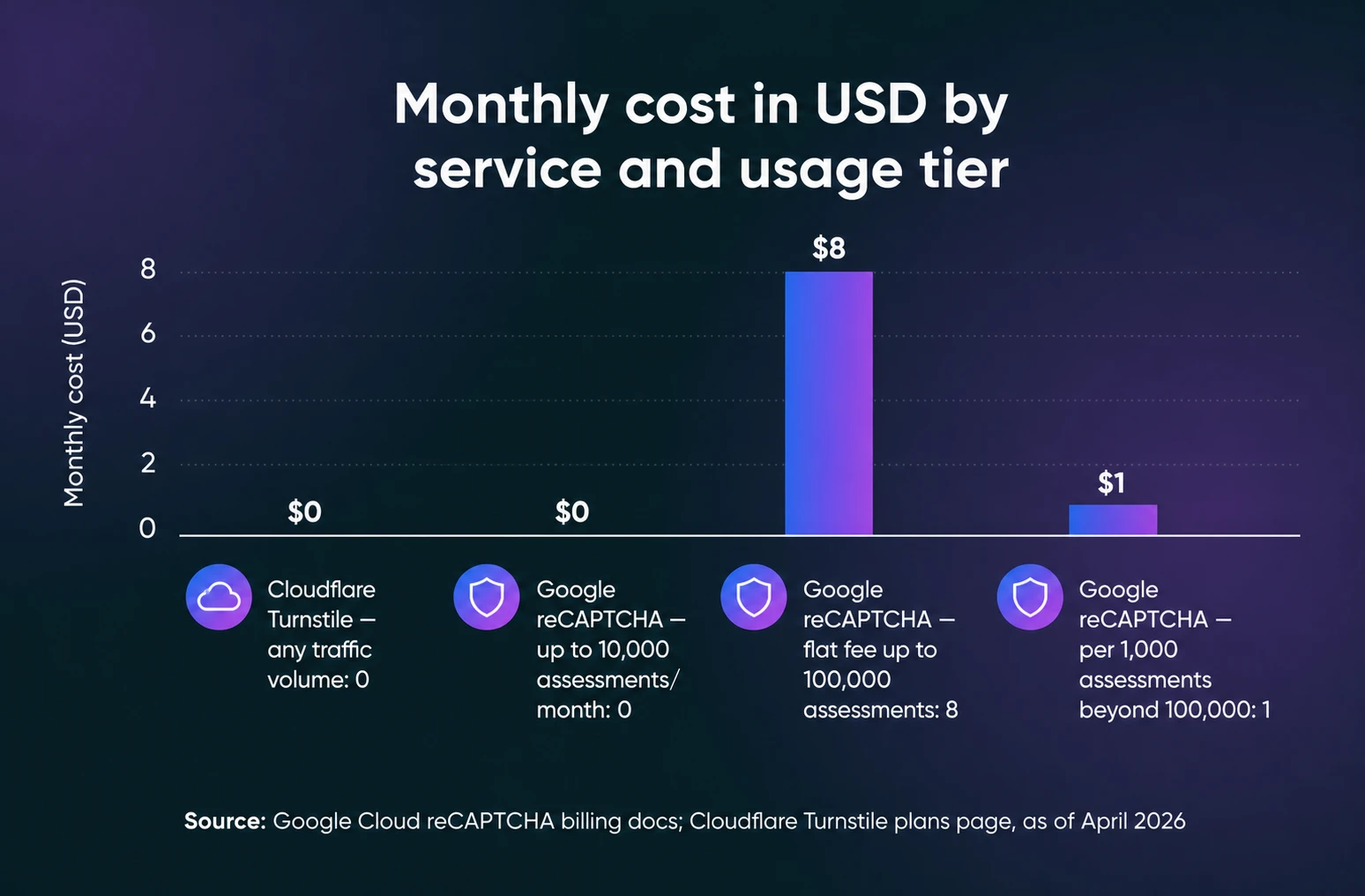
For years, Google reCAPTCHA was the default answer to comment spam and bot signups: free, everywhere, and good enough. But it’s no longer free beyond a limited allowance: Google moved reCAPTCHA under Google Cloud billing (announced in 2024, in effect since 2025), and it’s now free only up to 10,000 assessments per month, per Google Cloud’s billing docs. That’s why many website owners and developers are looking for free, privacy-friendly alternatives.
The good news: you’ve got solid options, and our top pick is Cloudflare Turnstile, a free, user-friendly CAPTCHA alternative that improves security without annoying your visitors. In this post, we’ll compare the best reCAPTCHA alternatives, explain why Turnstile is our pick, and show you how to set it up on your WordPress site.
Why look for a Google reCAPTCHA alternative?
While Google reCAPTCHA has been effective in blocking automated spam and abuse, its pricing model (in effect since 2025) is a dealbreaker for many small businesses, bloggers, and website owners. Here’s why an alternative makes sense:
- Cost: reCAPTCHA is free only up to 10,000 assessments per calendar month per organization; beyond that, it’s an $8 flat fee up to 100,000 assessments and $1 per 1,000 after, per Google Cloud’s billing docs. Free-tier keys stop working entirely once the monthly quota is hit.
- Privacy concerns: Google’s reCAPTCHA sets a _GRECAPTCHA cookie and connects to Google’s domains to run its risk analysis, per Google’s own reCAPTCHA FAQ — a privacy trade-off many site owners would rather avoid.
- User experience: Many users find reCAPTCHA frustrating, especially the “select every square with a traffic light” image challenges that can take multiple tries to clear.
The best reCAPTCHA alternatives
Cloudflare Turnstile is the best free reCAPTCHA alternative for most WordPress sites: it’s free with unlimited challenges, it doesn’t make visitors solve puzzles, and it takes minutes to set up. It’s not the only credible option, though. Here’s how the field compares:
| Tool | Price | Privacy approach | Visitor friction | Hosting model | WordPress support |
|---|---|---|---|---|---|
| Cloudflare Turnstile | Free (unlimited challenges, up to 20 widgets) | No data harvested for ad retargeting | None to minimal; a checkbox at most | Hosted by Cloudflare | Free plugin covers core, WooCommerce, and major form plugins |
| hCaptcha | Free Basic plan; Pro from $99/month billed annually | GDPR, CCPA, LGPD, and PIPL compliance | Visible challenges on the free plan; “99.9% passive” mode is Pro | Hosted by hCaptcha | Plugins and integrations available |
| Friendly Captcha | No free tier; from €9/month with a 30-day trial | GDPR-compliant, no cookies | Invisible proof-of-work check | Hosted (German company) | Prebuilt WordPress integration |
| ALTCHA | Self-hosted; paid Cloud option available | No tracking, cookies, or fingerprinting | Frictionless by default; code challenge for high-risk traffic | Self-hosted (or ALTCHA Cloud) | WordPress plugin with unlimited verifications |
- Cloudflare Turnstile (our pick): Free with unlimited challenges and up to 20 widgets, per Cloudflare’s plans page (April 2026). No puzzles, no data harvested for ad retargeting, and a free WordPress plugin that covers practically every form on your site.
- hCaptcha: A drop-in reCAPTCHA replacement with a free Basic plan; hCaptcha’s pricing page puts the Pro plan (which adds the low-friction “99.9% passive” mode) at $99/month billed annually. Best if you may want risk scores and enterprise bot defense later.
- Friendly Captcha: An invisible, proof-of-work CAPTCHA from a German company built around GDPR compliance. There’s no free tier; plans start at €9/month for one domain and 1,000 requests. Best for EU sites where privacy paperwork rules the decision.
- ALTCHA: A self-hosted, privacy-first option: ALTCHA runs proof-of-work checks with no tracking, cookies, or fingerprinting, and its WordPress plugin includes unlimited verifications. Best if everything must stay on your own server.
For a typical WordPress site, Turnstile wins on the combination that matters: $0 at any traffic level, minimal visitor friction, and the easiest setup. The rest of this guide digs into why — and how to install it.
Introducing Cloudflare Turnstile: a free, privacy-focused CAPTCHA
Cloudflare Turnstile is a free and privacy-friendly CAPTCHA alternative designed to verify visitors without requiring interaction. Unlike reCAPTCHA, Turnstile doesn’t harvest visitor data for ad retargeting, and it doesn’t make visitors solve visual puzzles.
Cloudflare Turnstile vs. Google reCAPTCHA
| Cloudflare Turnstile | Google reCAPTCHA | |
|---|---|---|
| Cost | Free — unlimited challenges, up to 20 widgets (per Cloudflare’s plans page) | Free up to 10,000 assessments/month, then $8 flat to 100,000 and $1 per 1,000 after (per Google Cloud’s billing docs) |
| Privacy | Never harvests data for ad retargeting | Sets a _GRECAPTCHA cookie and connects to Google’s domains |
| User experience | No puzzles; at most a checkbox in Managed mode | Can require image challenges (v2) |
| Widget modes | Managed, Non-interactive, and Invisible | v2 (checkbox and Invisible) and score-based v3 |
| Google dependency | None; runs on Cloudflare and doesn’t require other Cloudflare services | Keys and billing live in a Google Cloud project |
| WordPress setup | Free plugin covers core, WooCommerce, and major form plugins | Supported by many form plugins, but keys now live in Google Cloud |
The short version: Turnstile gives you the protection without the bill, and without your visitors’ data being harvested for ads.
Key benefits of Cloudflare Turnstile:
✅ Completely free: Unlimited challenges and up to 20 widgets on Cloudflare’s free plan, no matter your website’s traffic.
✅ No Google dependency: Works independently of Google services.
✅ Privacy-friendly: Doesn’t harvest visitor data for ad retargeting, per Cloudflare.
✅ Smooth user experience: Automatically detects bots without frustrating human visitors.
✅ Easy integration: Works with WordPress forms, login pages, WooCommerce, and more.
Here’s the list of supported forms:
WordPress:
- Login Form
- Registration Form
- Password Reset Form
- Comments Form
WooCommerce:
- Checkout
- Pay For Order
- Account Details Form
- Login Form
- Registration Form
- Password Reset Form
Form Plugins:
- WPForms
- Fluent Forms
- Contact Form 7
- Gravity Forms
- Formidable Forms
- Forminator Forms
- Jetpack Forms
- Kadence Forms
- SureForms
Other integrations:
- Elementor Pro Forms
- Easy Digital Downloads Forms
- Paid Memberships Pro Forms
- Mailchimp for WordPress Forms
- MailPoet Forms
- BuddyPress Registration Form
- bbPress Create Topic & Reply Forms
- MemberPress Forms
- Ultimate Member Forms
- WP-Members Forms
- WP User Frontend Forms
- WP User Manager Forms
- wpDiscuz Comments Form
- CheckoutWC & Flux Checkout
- Sunshine Photo Cart
This plugin is also compatible with WordPress Multisite, and most two-factor authentication (2FA) plugins.
Where Turnstile falls short
No tool is flawless, so here are the honest trade-offs. Cloudflare’s plans page caps the free plan at 20 widgets and 10 hostnames per widget, with a 7-day analytics lookback, which is plenty for most sites, but agencies juggling many domains can hit the ceiling. Removing Cloudflare’s branding from the widget requires the Enterprise plan. And Invisible mode comes with a paperwork string: Cloudflare requires you to reference its Turnstile Privacy Addendum in your own privacy policy.
How to set up Cloudflare Turnstile on WordPress
Adding Cloudflare Turnstile to your WordPress site is simple with the Simple CAPTCHA with Cloudflare Turnstile plugin. Follow these steps to get started:
1. Install the Simple CAPTCHA with Cloudflare Turnstile plugin
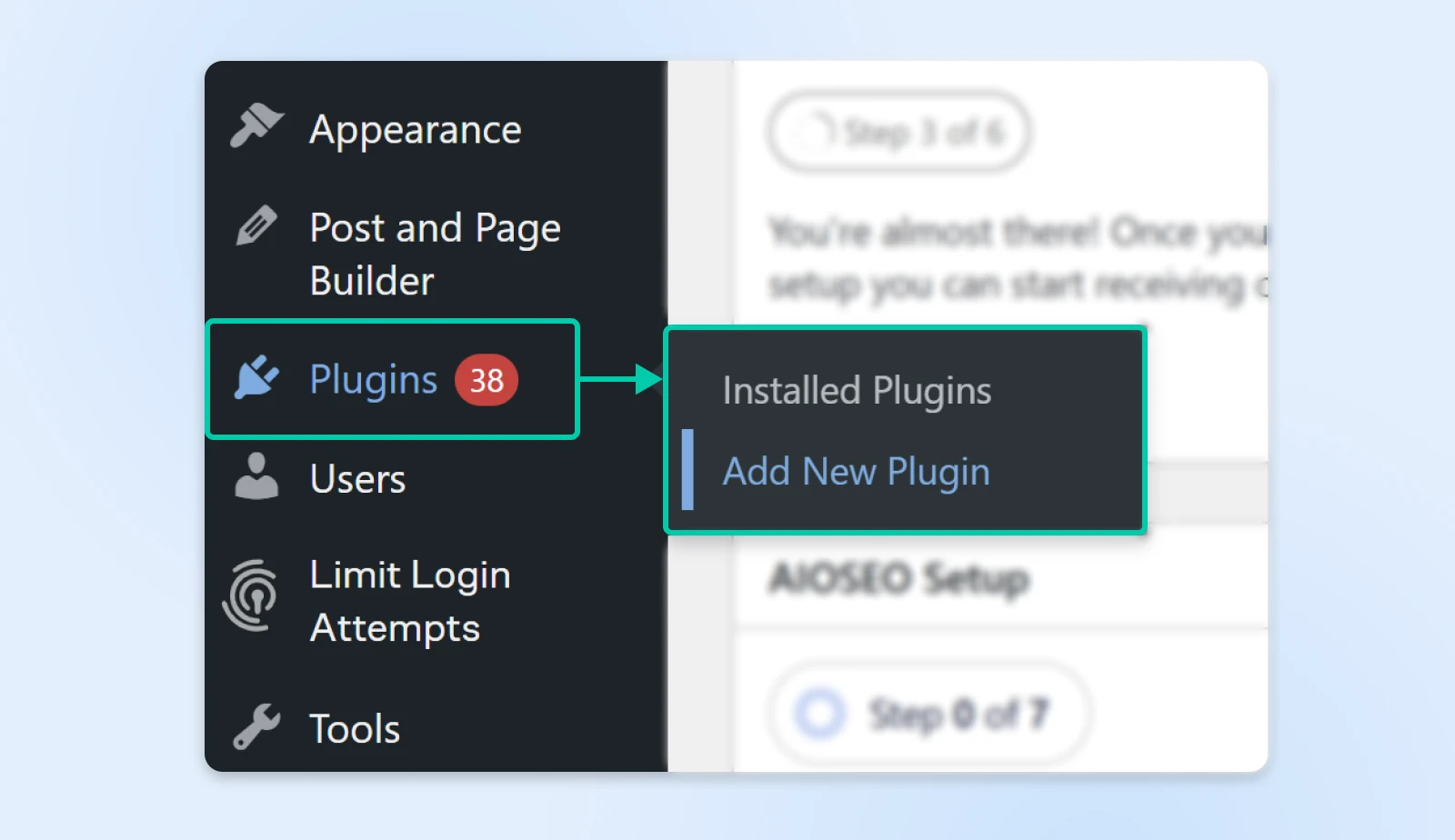
Log in to your WordPress dashboard. Go to Plugins > Add New Plugin.
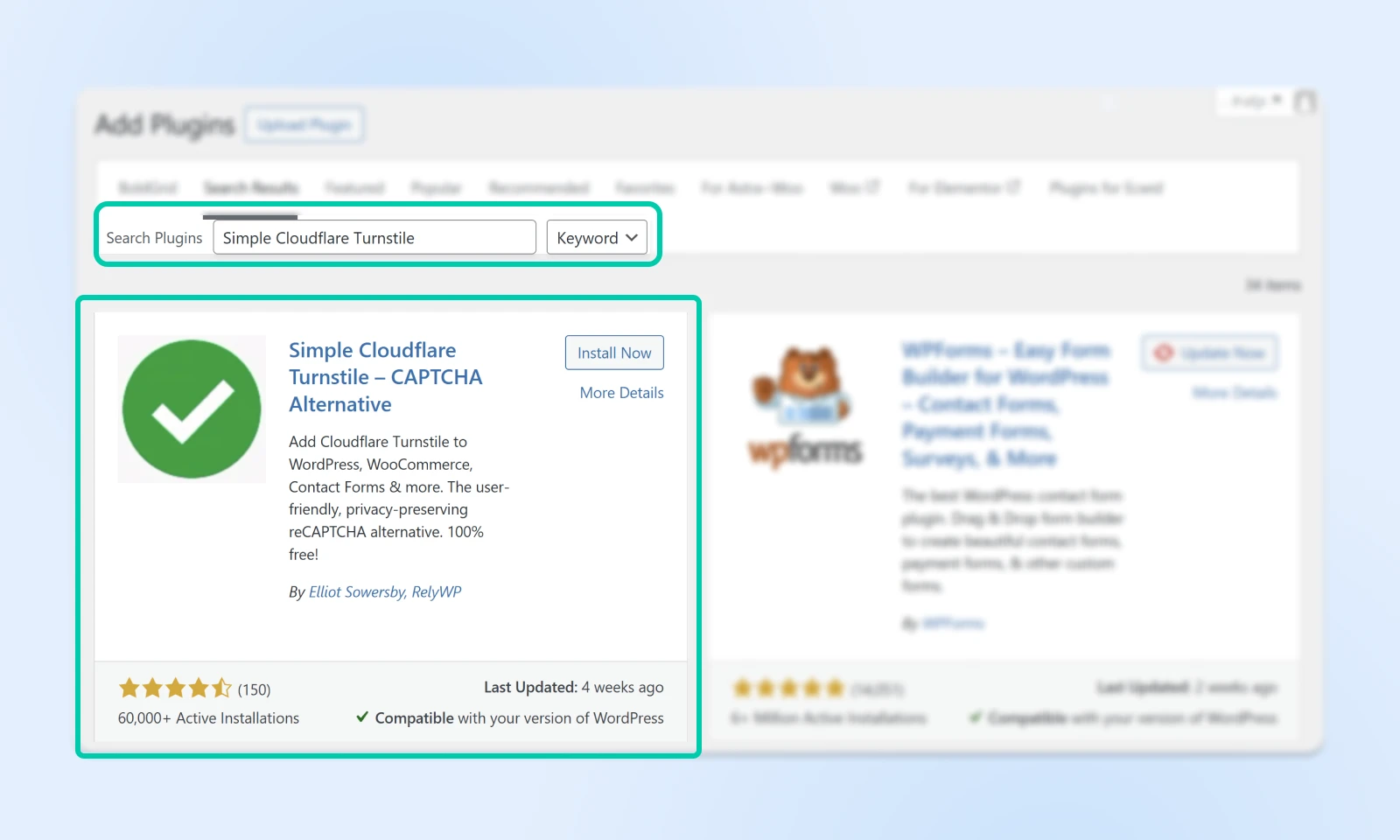
Search for “Simple Cloudflare Turnstile.” The plugin now appears in the directory under its current name, “Simple CAPTCHA with Cloudflare Turnstile” — same plugin, just renamed. Click Install Now.
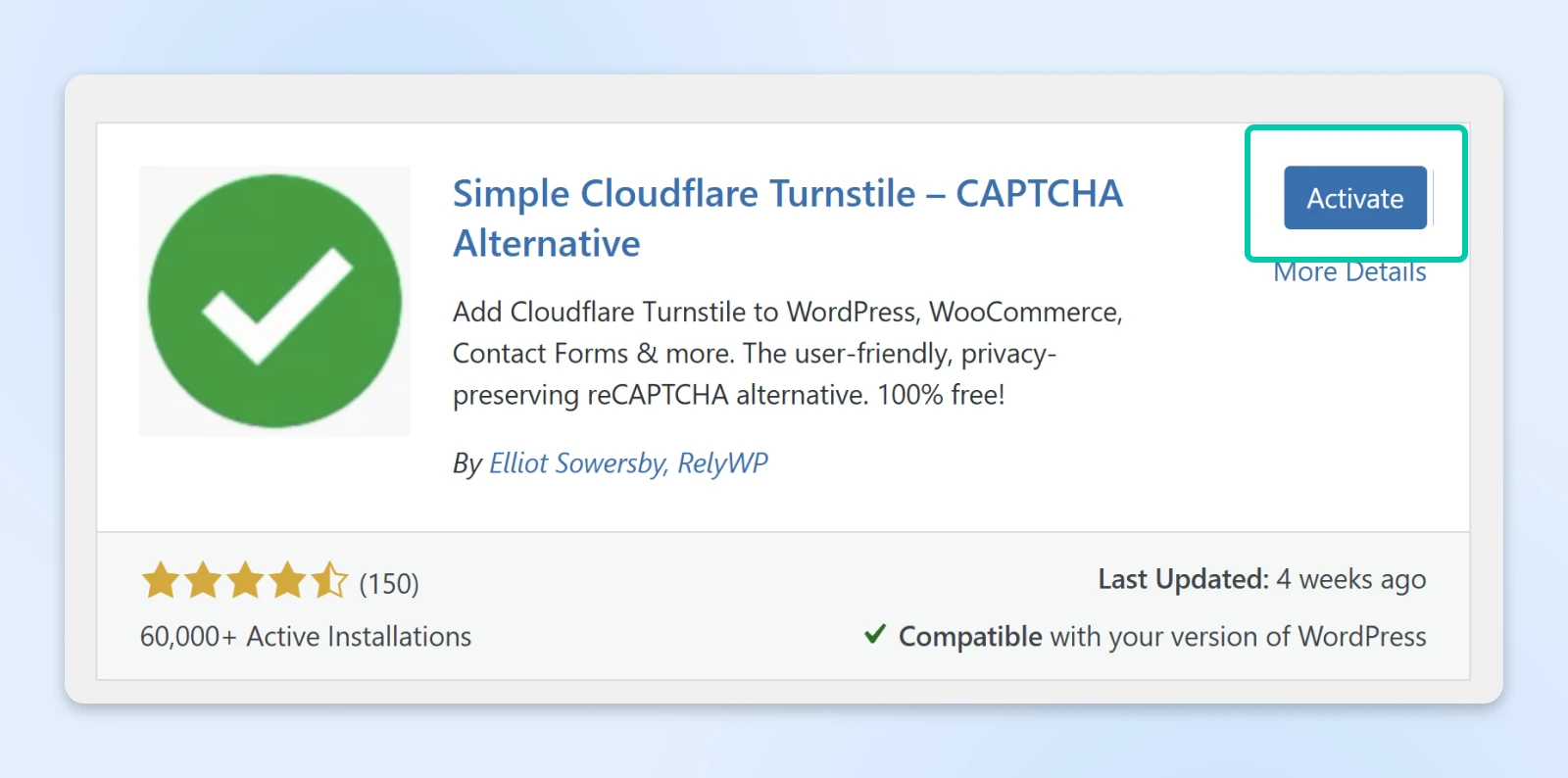
When installed, the “Install Now” button will read “Activate.” Click Activate to continue.
2. Get your Cloudflare API keys
Visit the Cloudflare Turnstile Dashboard and create a free Cloudflare account if you don’t have one.
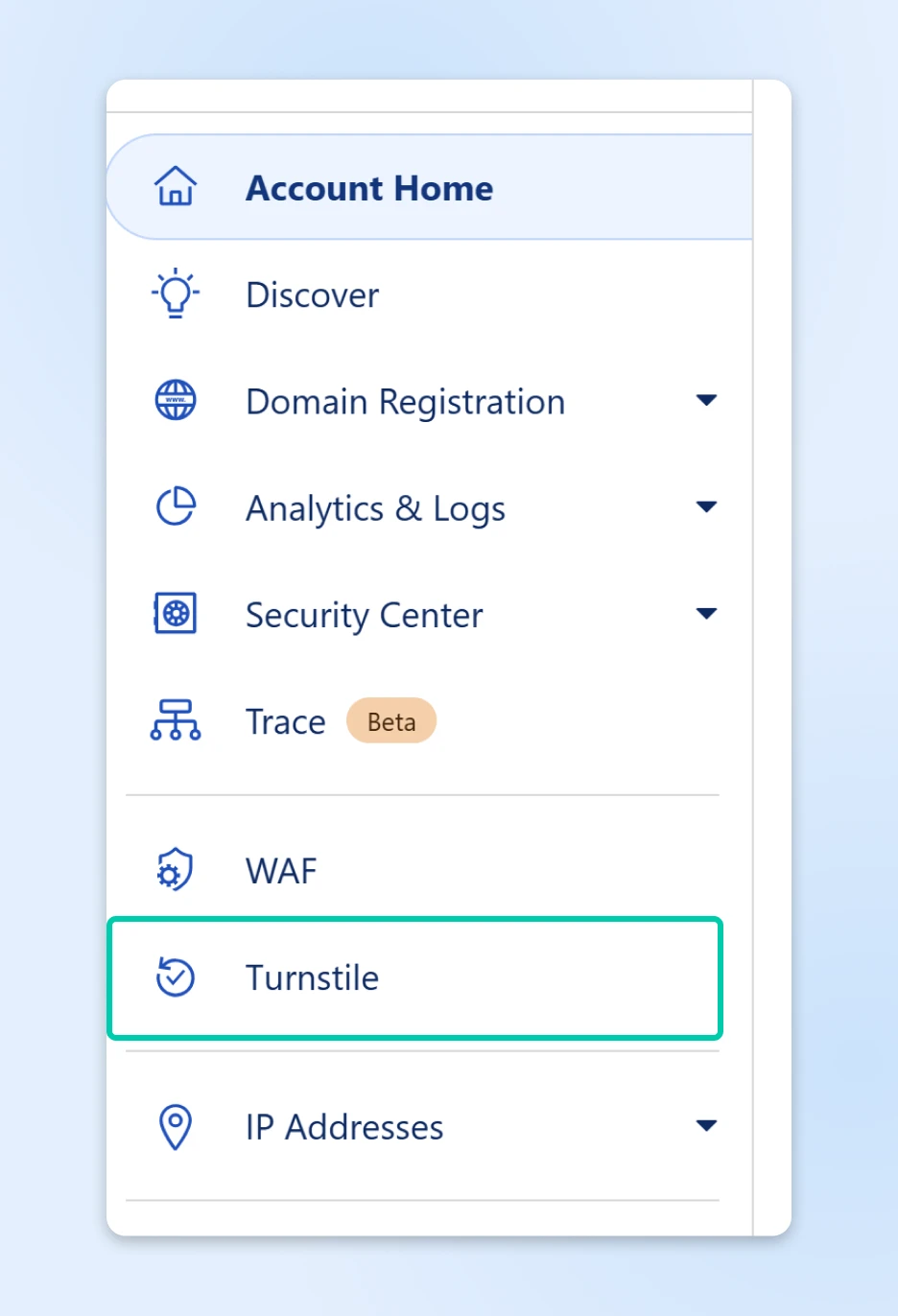
In the left-hand navigation, click on Turnstile.
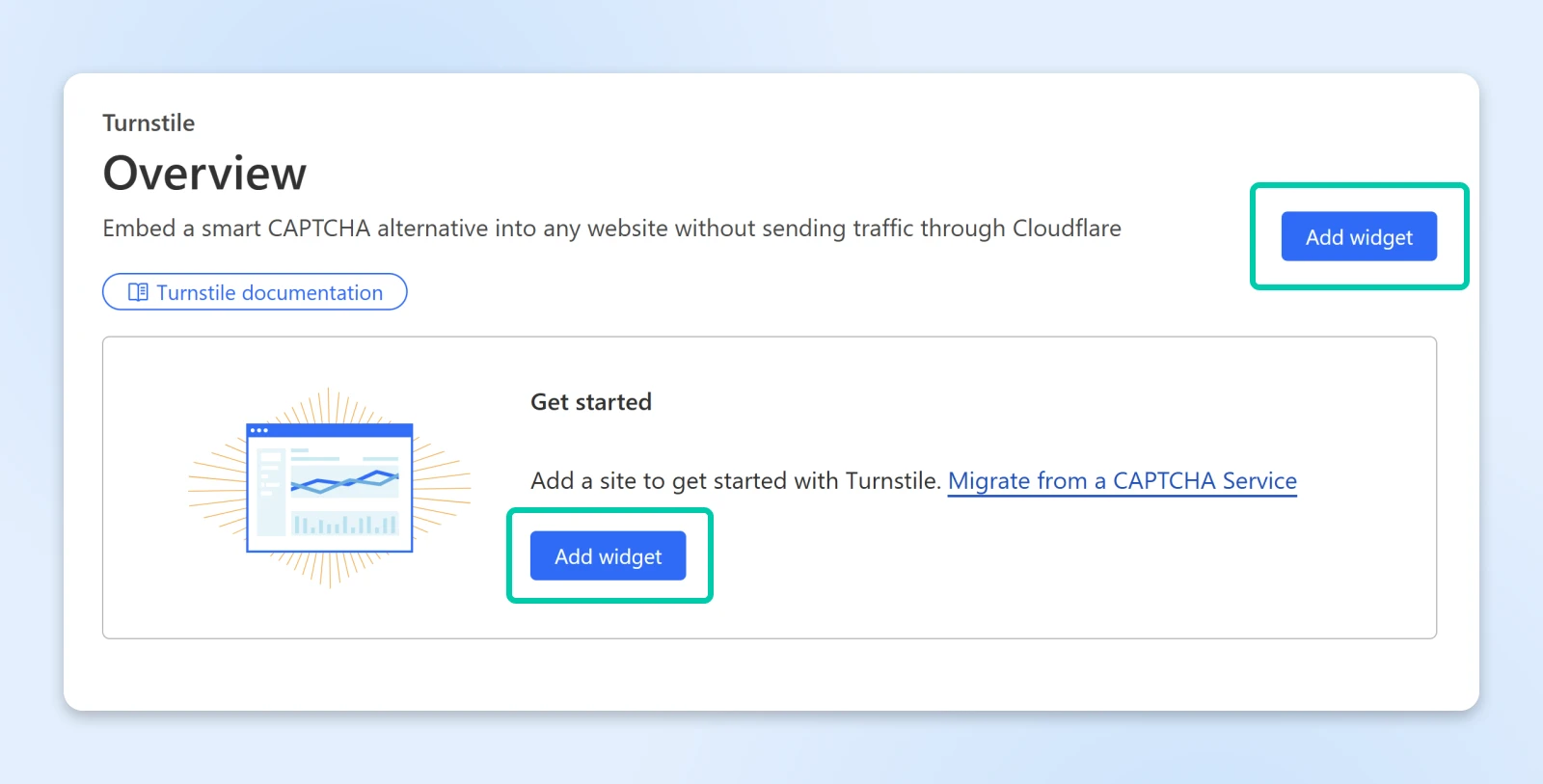
Then click on Add widget.
In the “Widget name” box, enter a tag you prefer to identify this widget. This will allow you to set up the specific way you want this Turnstile widget to work.
Then in “Hostname Management” click + Add Hostnames to assign one or more domains where you want to use this widget. Add the root domain (for example, “example.com”) to cover it and all of its subdomains; add a specific subdomain only if you want to restrict the widget to that hostname.
So, for example:
- “domain.com”
- “mysite.me”
- “example.co”
You can then choose from three “Widget Modes.” This will determine how Turnstile behaves:
- Managed: Cloudflare will decide if a visitor has to complete a “challenge” of some sort to clear the CAPTCHA.
- Non-interactive: Displays a visible widget with a loading spinner while the challenge runs, requiring no interaction.
- Invisible: Runs the check completely in the background, with no visible widget. Heads up: Cloudflare requires sites using Invisible mode to reference its Turnstile Privacy Addendum in their privacy policy.
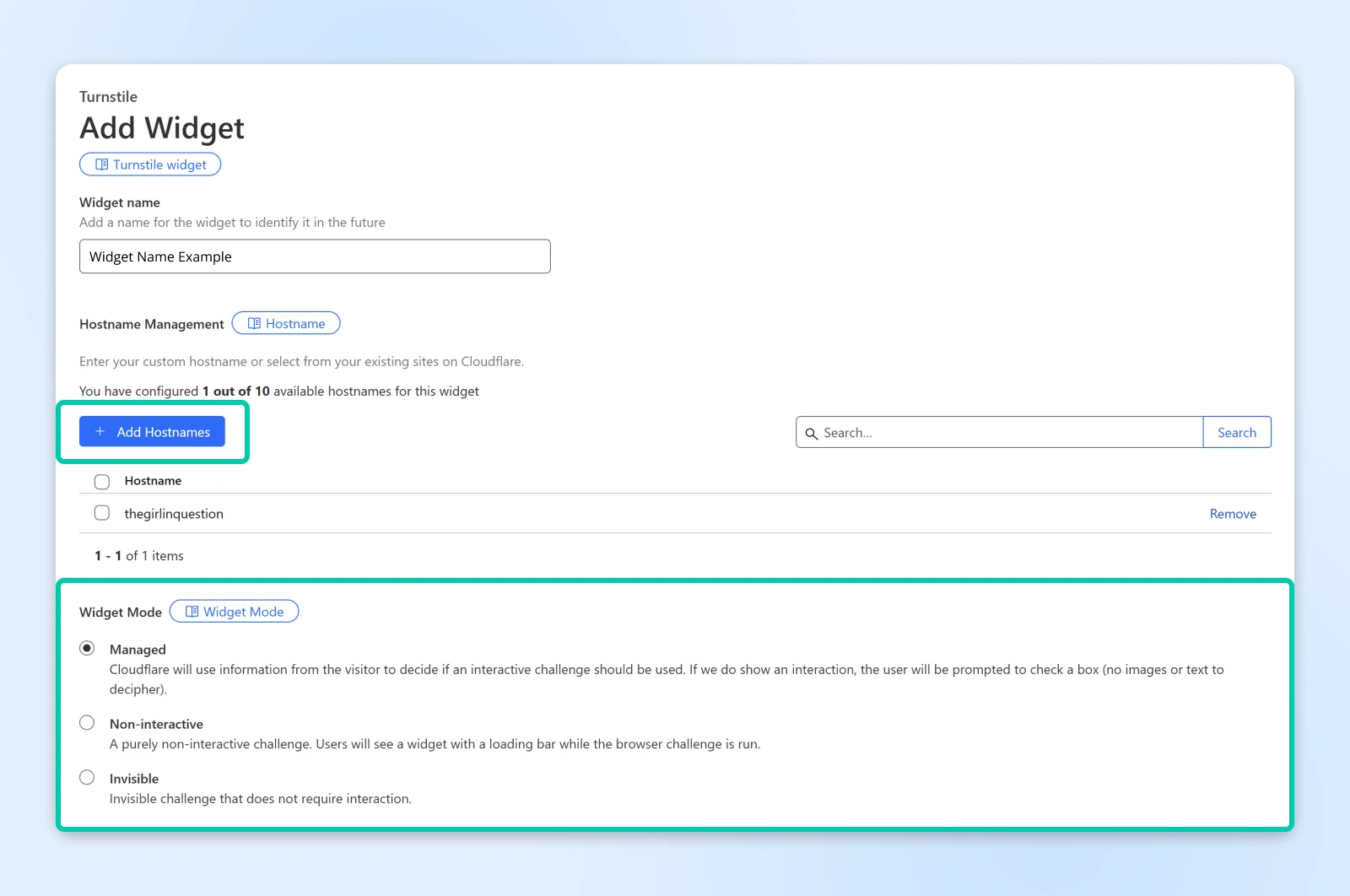
Once you’ve filled in your options, click Create.
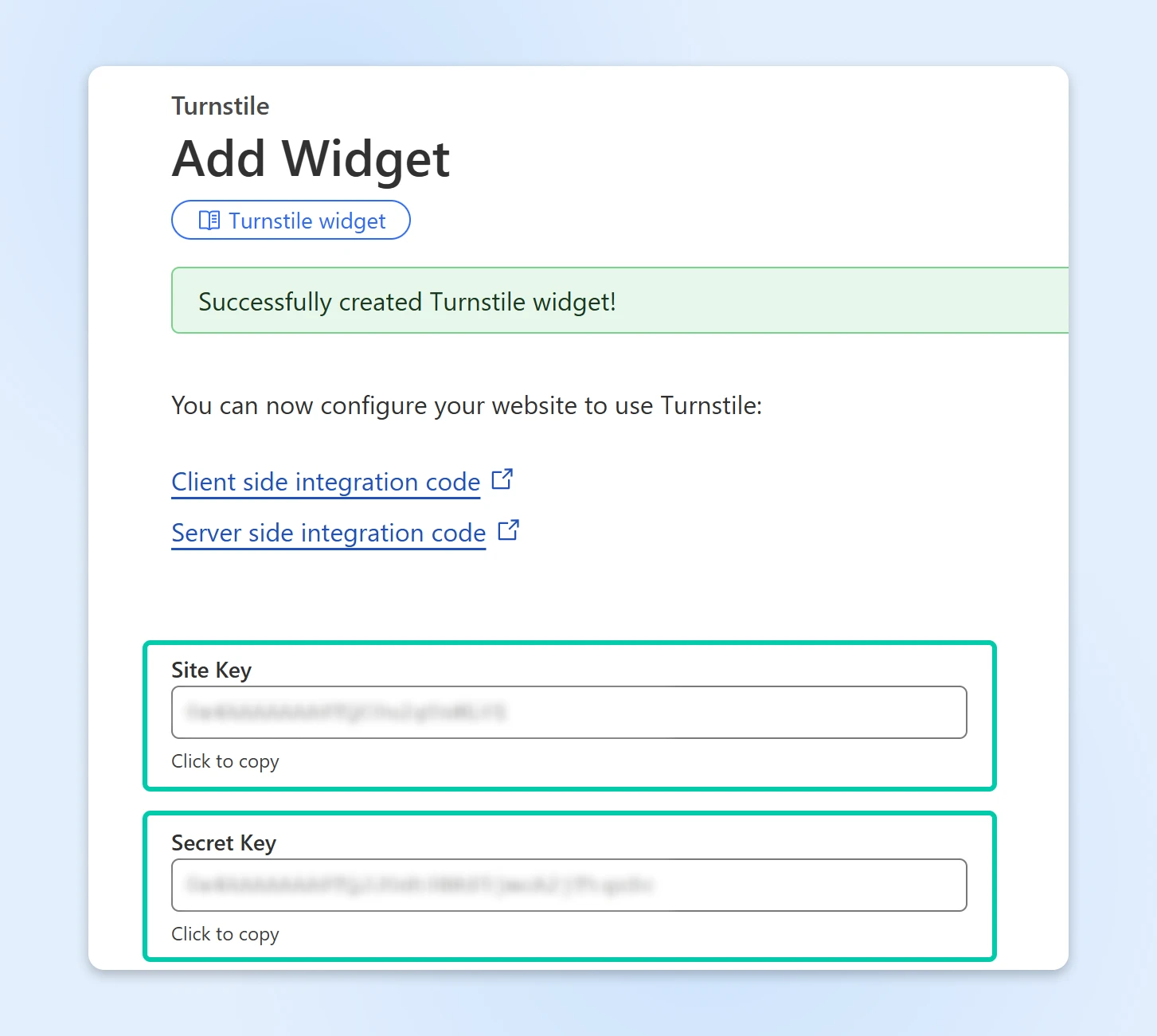
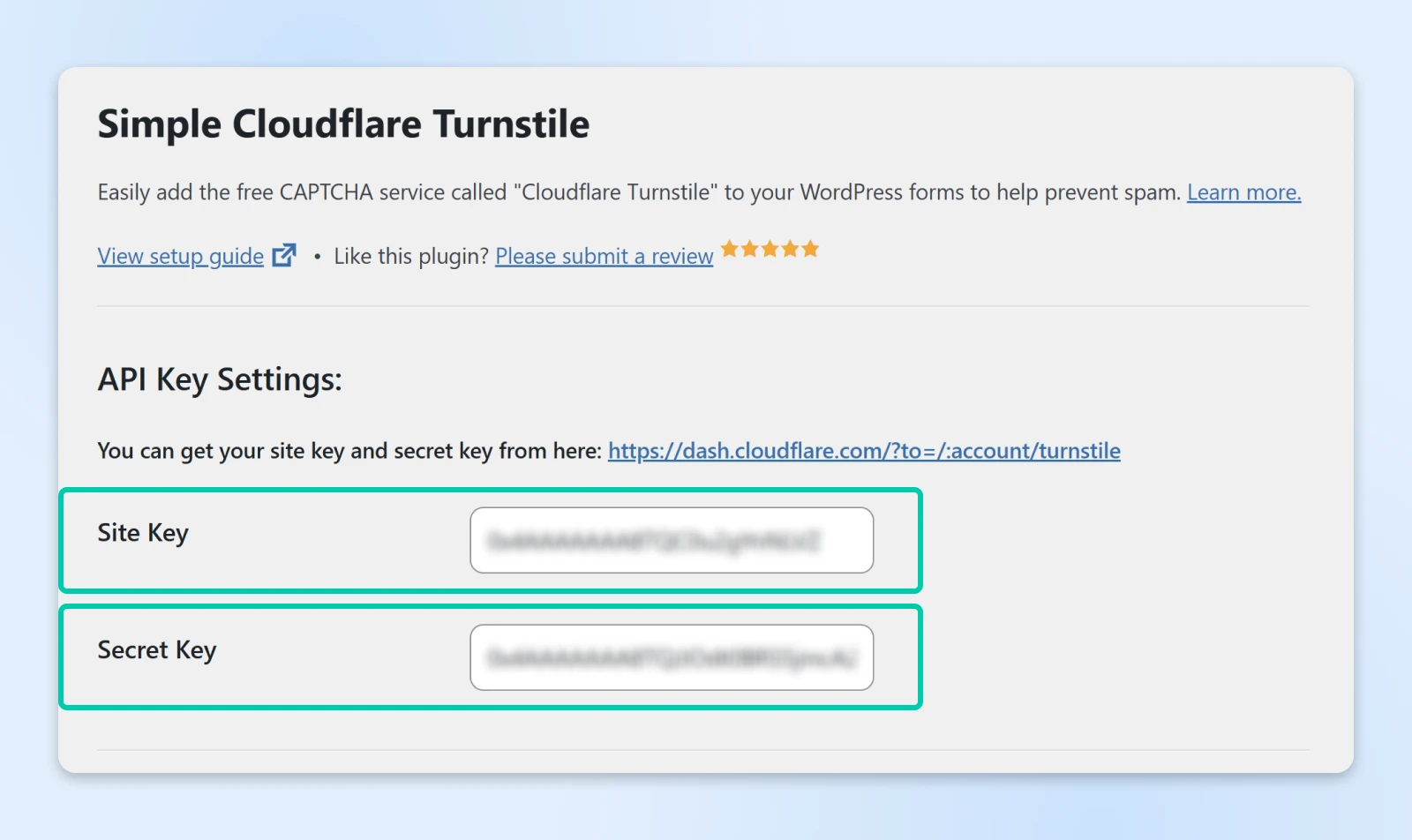
Cloudflare will display your “Site Key” and your “Secret Key.”
Keep this tab open. In the next step, you’ll navigate to WordPress to copy and paste these two keys.
3. Configure the plugin in WordPress
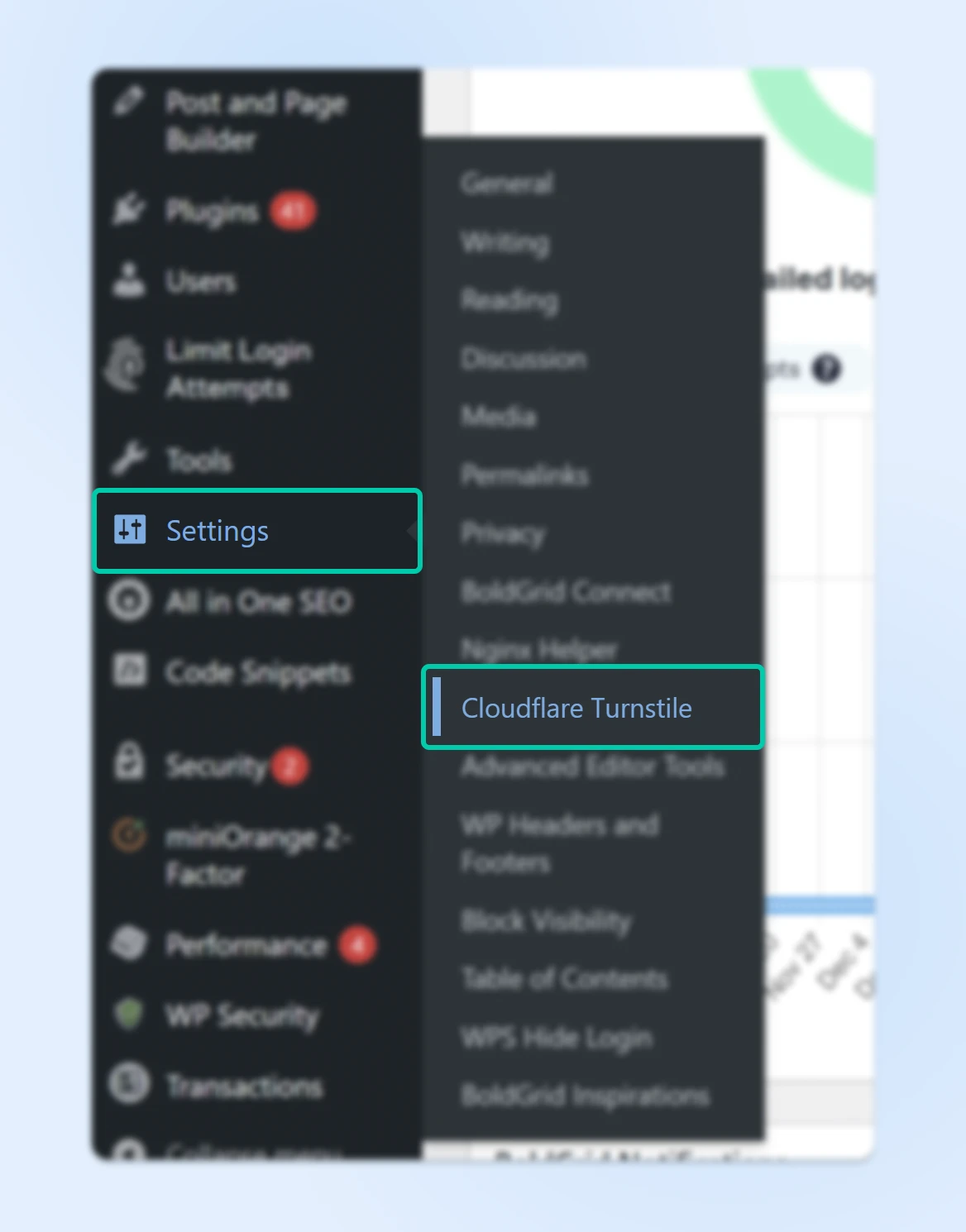
Go to Settings > Cloudflare Turnstile in your WordPress admin panel.
Enter your “Site Key” and “Secret Key” from Cloudflare.
Once you paste the keys, you’ll receive a notice asking you to “test” the setup. The system will let you know if it’s correct after a few seconds.
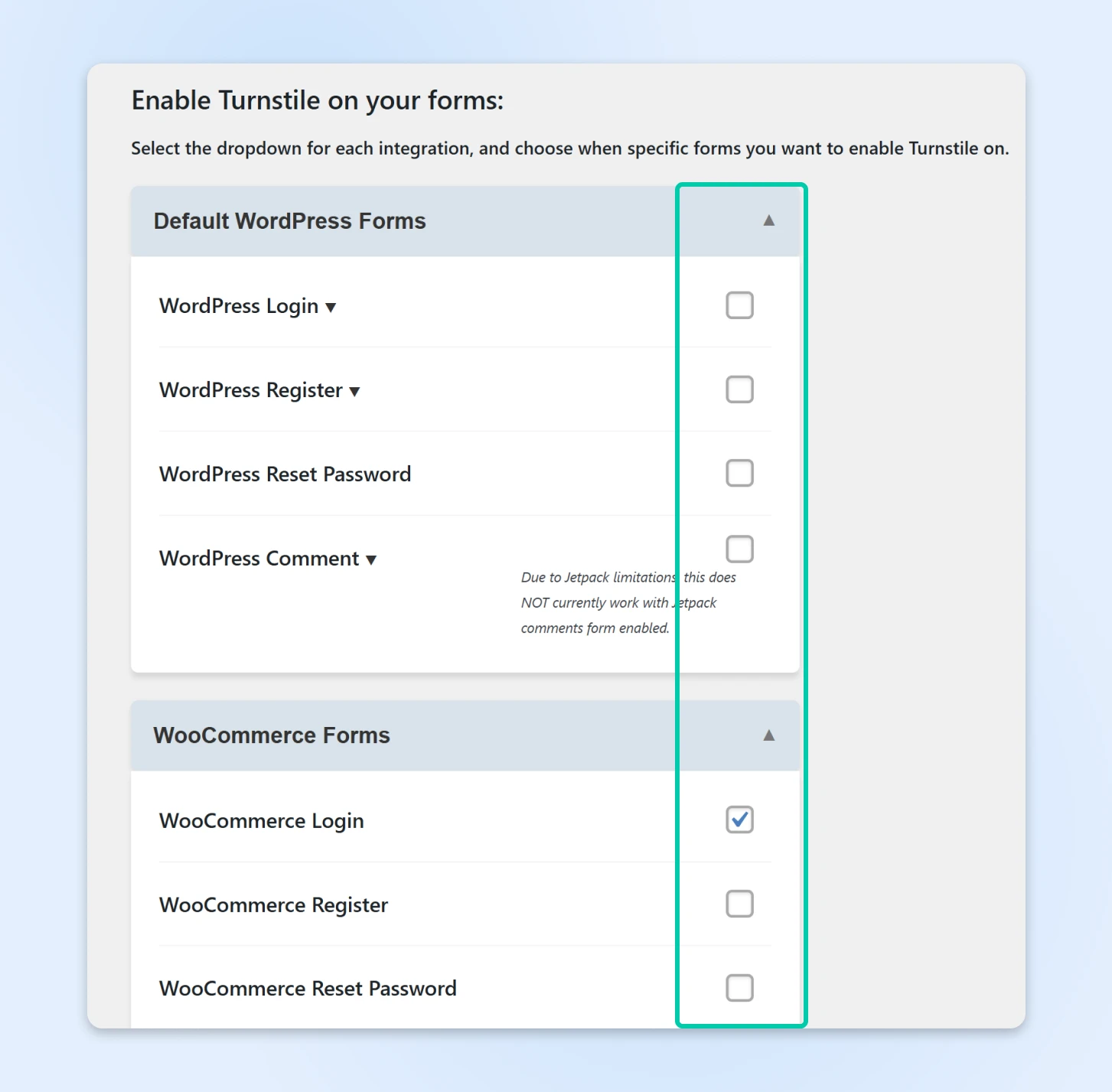
Scroll down and choose which forms you want Turnstile enabled on (e.g., login page, comments, WooCommerce checkout).
Save changes and test the CAPTCHA on your site!
4. Remove reCAPTCHA from your forms
Switching from reCAPTCHA? There’s one more step: turn off the CAPTCHA you’re replacing. If reCAPTCHA is still active in a form plugin (Contact Form 7, WPForms, or WooCommerce, for example), both checks can run on the same form — doubling the friction and sometimes blocking legitimate submissions.
Open each form plugin’s settings, find its CAPTCHA or integration options, and remove the saved reCAPTCHA keys (or untick reCAPTCHA for that form). Then submit a test entry on every form to confirm only Turnstile appears.
Troubleshooting: locked out of wp-admin?
Always complete the plugin’s key test before you enable Turnstile on the login form — a mistyped Site Key or Secret Key there can lock you out of your own dashboard.
If it happens, don’t panic. Connect to your site via SFTP or your host’s file manager and rename the /wp-content/plugins/simple-cloudflare-turnstile/ folder (like simple-cloudflare-turnstile-off). WordPress deactivates the plugin, you log back in, restore the folder name, and fix the keys before re-enabling it on the login form.
FAQs about reCAPTCHA alternatives
Is Google reCAPTCHA still free?
Only up to 10,000 assessments per calendar month per organization. Beyond that, Google charges an $8 flat fee up to 100,000 assessments and $1 per 1,000 after, per Google Cloud’s billing docs, and free-tier keys stop working once the quota is hit.
What’s the best free alternative to Google reCAPTCHA?
Cloudflare Turnstile. It’s free with unlimited challenges, doesn’t show visitors puzzles, and installs on WordPress in minutes. hCaptcha’s free plan and the self-hosted ALTCHA are solid runners-up, depending on your traffic and privacy needs.
Is Cloudflare Turnstile really free?
Yes. Cloudflare’s free plan includes unlimited challenges, up to 20 widgets, and 10 hostnames per widget. An Enterprise plan exists for high-volume sites that need custom branding, but most WordPress sites will never need it.
Does Cloudflare Turnstile work with Contact Form 7?
Yes. The Simple CAPTCHA with Cloudflare Turnstile plugin adds Turnstile to Contact Form 7, plus WPForms, Gravity Forms, Fluent Forms, WooCommerce, and WordPress’s own login, registration, and comment forms.
Can I run reCAPTCHA and Turnstile at the same time?
Not on the same form. Two CAPTCHA layers add friction and can block legitimate submissions. Remove your reCAPTCHA keys from each form plugin before (or right after) you enable Turnstile.
Wrapping Up
Now that Google reCAPTCHA has shifted to a paid model, it’s the perfect time to switch to a free and privacy-friendly alternative like Cloudflare Turnstile. It’s easy to set up, improves user experience, and helps keep your WordPress site secure, without any extra costs.
If you’re a DreamHost customer, you can use Cloudflare Turnstile on any of DreamHost’s WordPress hosting plans to keep your site protected without slowing your visitors down.
Ready to make the switch? Download the Simple CAPTCHA with Cloudflare Turnstile plugin and start protecting your site today!
Need more help?
At DreamHost, we’re committed to helping you build secure, high-performance websites. If you have questions or need assistance with your WordPress security setup, check out our WordPress hosting plans or reach out to our expert Support team!

Unbeatable WordPress Hosting
Reliable, lightning-fast hosting solutions specifically optimized for WordPress.
See MoreThis page contains affiliate links. This means we may earn a commission if you purchase services through our link without any extra cost to you.
Did you enjoy this article?